
Преземање на Smarters Player Lite за компјутер: Целосно поставување на IPTV и водич
Проценето време на читање: 12 минути
Клучни Килими
- Разбирање на IPTV: IPTV користи интернет конекција наместо традиционални методи, обезбедувајќи флексибилност во пристапот до содржината.
- Компатибилност на уредот: Различните уреди бараат уникатни методи за инсталација на IPTV апликации.
- Важноста на EPG: Електронскиот програмски водич (EPG) значително го подобрува искуството при гледањето.
- Процес на инсталација: Инсталирањето на IPTV апликации варира во зависност од уредот и често може да вклучува апликации како Downloader.
- Смена на проблеми: Може да се појават вообичаени проблеми, но повеќето можат лесно да се решат со соодветно знаење.
Содржина
- Вовед
- Што ја прави IPTV различна
- APK датотеки наспроти матични апликации
- Популарни опции за IPTV плеер
- Преглед на компатибилноста на уредот
- Чекор-по-чекор инсталација на Firestick
- Процес на поставување на паметен телевизор
- Преземање на Smarters Player Lite за компјутер
- Конфигурација на Xbox и MAG Box
- Универзален работен тек за поставување
- Решавање на вообичаени проблеми
- Безбедност и правни размислувања
- Најчесто поставувани прашања
Вовед
Ова упатство ќе ви даде увид во користењето на IPTV плеери и разбирањето на различните формати на датотеки што ги придружуваат. Опремени со вистинското знаење, можете да го оптимизирате поставувањето на вашата IPTV за непречено искуство при гледање.
Што ја прави IPTV различна
IPTV (Интернет протокол телевизија) стримува содржина преку вашата интернет конекција, нудејќи предности во однос на традиционалните кабелски системи. Клучните компоненти што вашата услуга обично ќе ги вклучува:
- An URL на плејлистата M3U или датотека што може да се преземе извор
- Акредитиви за Xtream Codes вклучувајќи URL на серверот, корисничко име и лозинка извор
- Факултативна URL-адреса на EPG (Електронски програмски водич) за пристап до распоредот на каналите извор
Ефективниот IPTV плеер обично поддржува M3U, Xtream Codes формати и претставува организиран интерфејс низ повеќе уреди.
APK датотеки наспроти матични апликации
An IPTV apk се однесува на инсталер на апликации за Android. Еве како да се направи разлика помеѓу различните методи на инсталација:
- Android/Fire оперативен систем: Користете APK-датотеки или Google Play Store извор
- iOS: Инсталирајте апликации само преку Apple App Store
- Windows/macOS: Преземете EXE/DMG инсталации од официјални страници извор
- Паметни телевизори: Инсталирајте преку соодветни продавници за апликации како Samsung Smart Hub
Популарни опции за IPTV плеер
Два преовладувачки IPTV играчи на пазарот се:
Карактеристики на Smarters Player Lite
Smarters Player Lite е разновиден и поддржува различни оперативни системи. Клучни карактеристики:
- Се справува со најавувања и со M3U и со Xtream кодови
- Нуди EPG интеграција и VOD библиотеки
За специфични URL-адреси и упатства, проверете го URL водич за Smarters Player Lite.
Можности за Xtream Player
Xtream Player е првенствено дизајниран за најавувања на Xtream Codes API со различно брендирање. Ако претпочитате IPTV Xtream плеер, проверете дали апликацијата ги исполнува вашите барања.
Преглед на компатибилноста на уредот
Методите за инсталација се разликуваат во зависност од видот на уредот:
Поставување на Firestick IPTV
Уредите Firestick работат на Fire OS, што овозможува стандардни инсталации на апликации од Amazon Appstore или други методи на странично вчитување на APK.
Ограничувања на Roku IPTV
Roku може да биде рестриктивен, барајќи официјални апликации кои прифаќаат M3U URL-адреси. Директните инсталации на APK не се олеснети.
Апликации за паметни ТВ
Паметните телевизори генерално поддржуваат наменски IPTV апликации. Изберете платформи како Samsung Smart Hub или LG Store за можности за инсталација.
Опции за Xbox IPTV
Побарајте поддржани апликации за медиа плеер во Microsoft Store или пристапете до IPTV услугите преку прелистувачот Edge.
Конфигурација на MAG кутија
Поставувањето на MAG кутија вклучува внесување на URL-адресата на порталот поврзана со вашата IPTV услуга.
Чекор-по-чекор инсталација на Firestick
Подгответе го вашиот Firestick
Овозможете ја опцијата „Инсталирај непознати апликации“ од менито Поставки под My Fire TV.
Инсталирај ја апликацијата за преземање
Пребарајте „Downloader“ на почетниот екран на Firestick и инсталирајте го.
Преземете и инсталирајте IPTV APK
- Отворете го Downloader и залепете ја URL-адресата на APK од веб-страницата на IPTV.
- Преземете ја датотеката (изберете помеѓу Smarters Pro или Lite).
- Следете ги упатствата за инсталација откако ќе заврши преземањето.
- Отстранете ја APK-датотеката за да заштедите простор.
Конфигурирајте ја вашата IPTV апликација
Внесете ги вашите Xtream кодови или M3U URL-адреса врз основа на вашиот формат на претплата откако ќе пристапите до вашата новоинсталирана апликација.
Процес на поставување на паметен телевизор
Инсталација на Samsung Smart TV
Пребарајте IPTV Smarters Pro во Samsung Smart Hub и инсталирајте го, а потоа најавете се со вашите IPTV акредитиви.
Конфигурација на LG Smart TV
Пребарајте IPTV апликации во LG Content Store и инсталирајте доверливи апликации.
Android TV и други платформи
Инсталирајте на Android TV преку Google Play Store врз основа на вашите IPTV преференции.
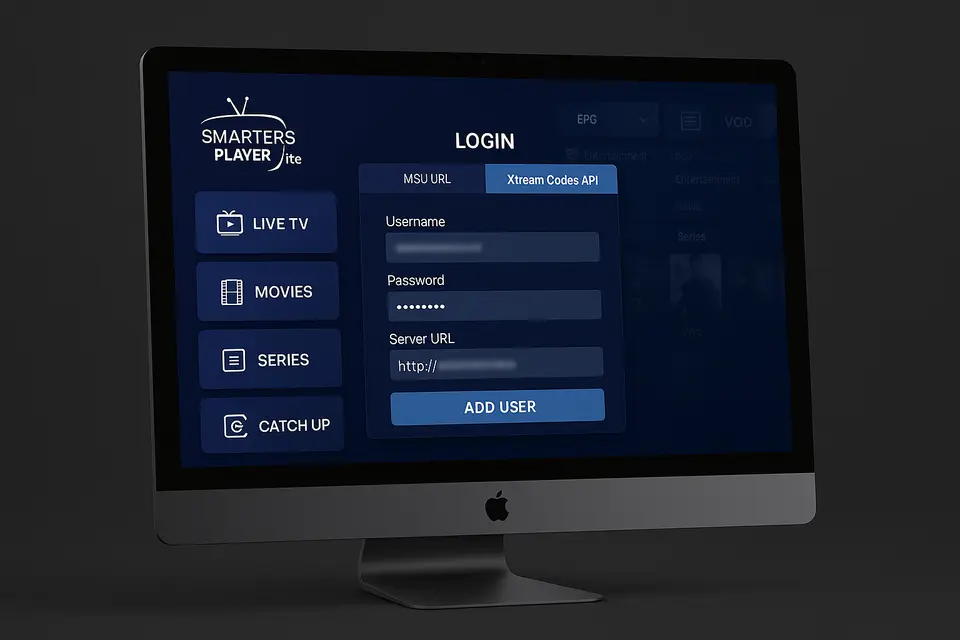
Преземање на Smarters Player Lite за компјутер
Преземи официјален инсталер
Посетете ја официјалната веб-страница на IPTV Smarters за да ги преземете инсталерите EXE или DMG од доверливи извори.
Процес на инсталација
Стартувајте го инсталерот и следете ги упатствата, ставајќи ја апликацијата во соодветната папка на Mac.
Почетна конфигурација
- Стартувајте го Smarters Player Lite на вашиот компјутер.
- Прифатете ги правилата и условите.
- Изберете „Додај нов корисник“ или слично.
- Внесете ги вашите Xtream кодови или M3U URL адреса.
- Зачувајте и почекајте апликацијата да ја вчита листата со канали.
Конфигурација на Xbox и MAG Box
Поставување на Xbox IPTV
Користете го Microsoft Store за компатибилни медиа плеери или пристапете до веб-базирани IPTV решенија преку прелистувачот Edge.
Конфигурација на порталот за MAG Box
Внесете ја URL-адресата на порталот обезбедена од вашата IPTV услуга во поставките на MAG полето.
Универзален работен тек за поставување
Соберете ги вашите акредитиви
Осигурајте се дека сте ги собрале сите потребни информации за поставување од вашиот IPTV провајдер:
- URL-адреса на M3U или датотека за преземање извор
- Акредитиви за Xtream Codes извор
- EPG URL за програмски водич извор
Изберете го вашиот играч
Одлучете помеѓу опции како Smarters Player Lite, IPTV Smarters Pro или IPTV Xtream плеер врз основа на вашите преференции.
Конфигурирајте и тестирајте
Внесете ги акредитивите во избраниот плеер и проверете го квалитетот на стримингот низ различни канали.
Решавање на вообичаени проблеми
Проблеми со поврзување и најавување
Проверете ги сите URL-адреси уште еднаш и осигурајте се дека вашата претплата е активна. Исправете ги сите печатни грешки во вашите акредитиви.
Проблеми со репродукцијата и перформансите
Оценете ја брзината на интернетот и сигурноста на конекцијата ако се соочувате со време на застој во меѓумеморијата.
Решенија специфични за уредот
Одредени чекори се разликуваат во зависност од уредот, како што е овозможувањето на „Опции за развивачи“ на Firestick за вчитување на апликации од страна.
Безбедност и правни размислувања
Секогаш преземајте IPTV апликации од проверени извори. Користете VPN за приватност и почитувајте ги локалните закони во врска со користењето на IPTV.
Најчесто поставувани прашања
Што е IPTV?
IPTV е кратенка од Интернет протокол телевизија, што ви овозможува да гледате содржини преку интернет наместо традиционалните методи на емитување.
Како да го пронајдам најдобриот IPTV плеер?
За да го пронајдете најдобриот IPTV плеер, побарајте компатибилност со M3U и Xtream кодовите, како и кориснички интерфејси и позитивни критики.
Може ли да инсталирам IPTV апликации на паметни телевизори?
Да, многу паметни телевизори поддржуваат IPTV апликации што можат да се преземат од нивните продавници за апликации.
Дали IPTV е легален?
Легалноста на IPTV зависи од провајдерот на содржини и договорите за лиценцирање што ги имаат склучено. Секогаш проверувајте ја усогласеноста на вашата услуга.
Што треба да направам ако мојата IPTV услуга не работи?
Ако вашата IPTV услуга не функционира, проверете ја вашата интернет-врска, потврдете дека вашата претплата е активна и прегледајте ги поставките во вашата апликација.