
Smarters Player Lite Download fir PC: Komplett IPTV-Installatioun a Guide
Geschätzte Lieszäit: 12 Minutten
Schlëssel
- IPTV verstoen: IPTV benotzt eng Internetverbindung amplaz vun traditionelle Methoden, wat Flexibilitéit beim Inhaltszougang bitt.
- Gerät Kompatibilitéit: Verschidde Geräter erfuerderen eenzegaarteg Installatiounsmethoden fir IPTV Apps.
- EPG Wichtegkeet: En elektronesche Programmguide (EPG) verbessert d'Kuckererfarung däitlech.
- Installatioun verdäitlechen: D'Installatioun vun IPTV-Applikatiounen variéiert jee no Apparat a kann dacks Applikatioune wéi den Downloader enthalen.
- Troubleshooting: Et kënnen heefeg Problemer optrieden, awer déi meescht kënne mat dem richtege Wëssen einfach geléist ginn.
Inhaltsverzeechnes
- Introduktioun
- Wat IPTV anescht mécht
- APK Dateien vs. Native Apps
- Populär IPTV Player Optiounen
- Apparat Kompatibilitéit Iwwersiicht
- Schrëtt-fir-Schrëtt Installatioun vum Firestick
- Prozess vun der Astellung vum Smart TV
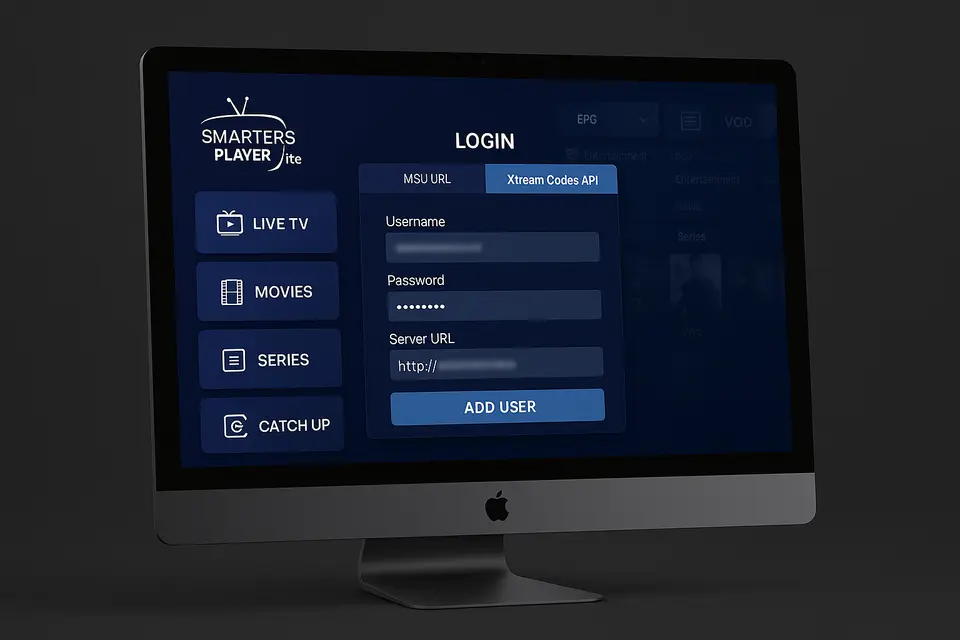
- Smarters Player Lite fir PC eroflueden
- Xbox a MAG Box Konfiguratioun
- Universal Setup Workflow
- Troubleshooting gemeinsam Problemer
- Sécherheet a legal Considératiounen
- Oft gestallten Froen
Introduktioun
Dëse Guide gëtt Iech Abléck an d'Benotzung vun IPTV-Player a Verständnis vun de verschiddene Dateiformater, déi domat verbonne sinn. Mat dem richtege Wëssen kënnt Dir Ären IPTV-Setup fir e reibungslosen Ukuckererlebnis optimiséieren.
Wat IPTV anescht mécht
IPTV (Internet Protocol Television) streamt Inhalt iwwer Är Internetverbindung a bitt Virdeeler géintiwwer traditionelle Kabelsystemer. Schlësselkomponenten vun Ärem Service enthalen typescherweis:
- An M3U Playlist URL oder erofluedbar Datei Quell
- Umeldungsinformatioune fir Xtream Codes inklusiv Server-URL, Benotzernumm a Passwuert Quell
- optional EPG (Elektronesche Programmguide) URL fir Zougang zu Kanalpläng Quell
En effektive IPTV-Player ënnerstëtzt typescherweis M3U- an Xtream Codes-Formater a bitt eng organiséiert Interface iwwer verschidde Geräter.
APK Dateien vs. Native Apps
An iptv apk bezitt sech op en Android Applikatiounsinstallatiounsprogramm. Hei ass wéi een tëscht verschiddenen Installatiounsmethoden ënnerscheet:
- Android/Fire Betribssystem: Benotzt APK-Dateien oder de Google Play Store Quell
- iOS: Apps nëmmen iwwer den Apple App Store installéieren
- Windows/macOS: Luet EXE/DMG Installatiounen vun offiziellen Säiten erof Quell
- Smart TVs: Installéiert iwwer jeeweileg App Stores wéi Samsung Smart Hub
Populär IPTV Player Optiounen
Zwee vun de populäersten IPTV-Akteuren um Maart sinn:
Smarters Player Lite Funktiounen
Smarters Player Lite ass villfälteg a ënnerstëtzt verschidde Betribssystemer. Schlëssel Highlights:
- Veraarbecht souwuel M3U wéi och Xtream Codes Logins
- Bitt EPG-Integratioun a VOD-Bibliothéiken
Fir spezifesch URLen an Hëllef, kuckt w.e.g. op Smarters Player Lite URL Guide.
Xtream Player Fäegkeeten
Xtream Player ass haaptsächlech fir Xtream Codes API-Logins mat verschiddene Branding entwéckelt. Wann Dir léiwer en iptv xtream Player, gitt sécher datt d'App Äre Ufuerderungen entsprécht.
Apparat Kompatibilitéit Iwwersiicht
Installatiounsmethoden ënnerscheede sech jee no Apparattyp:
Firestick IPTV-Astellung
Firestick-Geräter lafen op Fire OS, wat Standard-App-Installatioune vum Amazon Appstore oder aner APK-Sideloading-Methoden erlaabt.
Roku IPTV Aschränkungen
Roku kann restriktiv sinn a verlaangt offiziell Apps, déi M3U URLs akzeptéieren. Direkt APK-Installatioune ginn net erméiglecht.
Smart TV Uwendungen
Smart TVs ënnerstëtzen am Allgemengen speziell IPTV-Applikatiounen. Wielt Plattforme wéi Samsung Smart Hub oder LG Store fir Installatiounsméiglechkeeten.
Xbox IPTV Optiounen
Sicht no ënnerstëtzte Mediaplayer-Applikatiounen am Microsoft Store oder gitt iwwer den Edge Browser op IPTV-Servicer zou.
MAG Box Konfiguratioun
D'Astelle vun enger MAG-Box bedeit d'Aginn vun der Portal-URL, déi mat Ärem IPTV-Service verbonnen ass.
Schrëtt-fir-Schrëtt Installatioun vum Firestick
Bereet Äre Feierstick vir
Aktivéiert "Onbekannt Apps installéieren" am Astellungsmenü ënner My Fire TV.
Installéiert d'Downloader-Applikatioun
Sicht no "Downloader" am Homescreen vum Firestick an installéiert et.
IPTV APK eroflueden an installéieren
- Öffnen den Downloader a pecht d'APK URL vun der IPTV Websäit an.
- Luet d'Datei erof (wielt tëscht Smarters Pro oder Lite).
- Follegt d'Installatiounsinstruktiounen nodeems den Download fäerdeg ass.
- Läscht d'APK-Datei fir Plaz ze spueren.
Konfiguréiert Är IPTV Applikatioun
Gitt Är Xtream Codes oder M3U URL baséiert op Ärem Abonnementformat an, nodeems Dir op Är nei installéiert App zougegraff hutt.
Prozess vun der Astellung vum Smart TV
Installatioun vu Samsung Smart TV
Sicht no IPTV Smarters Pro am Samsung Smart Hub an installéiert et, loggt Iech dann mat Ären IPTV-Umeldungsinformatiounen un.
LG Smart TV Konfiguratioun
Sicht no IPTV Apps am LG Content Store an installéiert vertrauenswierdeg Applikatiounen.
Android TV an aner Plattformen
Installéiert op Android TV iwwer de Google Play Store baséiert op Ären IPTV-Astellungen.
Smarters Player Lite fir PC eroflueden
Offiziellen Installateur eroflueden
Besicht déi offiziell IPTV Smarters Websäit fir d'EXE- oder DMG-Installatiounsprogrammer aus vertrauenswürdege Quellen erofzelueden.
Installatiounsprozess
Start den Installateur a befollegt d'Uweisungen, andeems Dir d'Applikatioun an den entspriechenden Dossier um Mac placéiert.
Initial Configuration
- Start Smarters Player Lite op Ärem PC.
- Akzeptéiert d'Konditioune.
- Wielt "Neie Benotzer derbäisetzen" oder ähnleches.
- Gitt Är Xtream Coden oder M3U URL an.
- Späichert a waart bis d'App d'Kanallëscht lued.
Xbox a MAG Box Konfiguratioun
Xbox IPTV-Astellung
Benotzt de Microsoft Store fir kompatibel Medienspiller oder gitt iwwer den Edge Browser op webbaséiert IPTV-Léisungen zou.
MAG Box Portal Konfiguratioun
Gitt d'Portal-URL vun Ärem IPTV-Service an d'Astellungen vun der MAG-Box an.
Universal Setup Workflow
Sammelt Är Umeldungsinformatiounen
Vergewëssert Iech, datt Dir all néideg Informatiounen fir d'Installatioun vun Ärem IPTV-Ubidder sammelt:
- M3U URL oder erofluedbar Datei Quell
- Umeldungsinformatioune fir Xtream Codes Quell
- EPG URL fir de Programmguide Quell
Wielt Äre Spiller
Entscheet tëscht Optiounen wéi Smarters Player Lite, IPTV Smarters Pro oder engem iptv xtream Player baséiert op Är Preferenzen.
Konfiguréieren an Test
Gitt d'Umeldungsinformatioune an Äre gewielte Player an a kontrolléiert d'Streamingqualitéit iwwer verschidde Kanäl.
Troubleshooting gemeinsam Problemer
Verbindungs- a Loginproblemer
Iwwerpréift all URLen nach eng Kéier a gitt sécher, datt Äert Abonnement aktiv ass. Korrigéiert all Tippfeeler an Ären Umeldungsinformatiounen.
Wiedergabe- a Leeschtungsproblemer
Evaluéiert Är Internetgeschwindegkeet an d'Zouverlässegkeet vun Ärer Verbindung, wann Dir Pufferzäiten hutt.
Apparat-spezifesch Léisungen
Verschidde Schrëtt variéiere jee no Apparat, wéi zum Beispill d'Aktivéierung vun Entwéckleroptiounen op Firestick fir Sideloading-Apps.
Sécherheet a legal Considératiounen
Luet ëmmer IPTV-Applikatioune vu verifizéierte Quellen erof. Benotzt e VPN fir d'Privatsphär ze garantéieren a respektéiert déi lokal Gesetzer betreffend d'Benotzung vun IPTV.
Oft gestallten Froen
Wat ass IPTV?
IPTV steet fir Internet Protocol Television, wat Iech erlaabt Inhalter iwwer den Internet ze kucken amplaz vun traditionelle Sendungsmethoden.
Wéi fannen ech dee beschten IPTV-Player?
Fir de beschten IPTV-Player ze fannen, kuckt no Kompatibilitéit mat M3U- an Xtream-Coden, souwéi no userfrëndlechen Interfaces a positiven Bewäertungen.
Kann ech IPTV Apps op Smart TVs installéieren?
Jo, vill Smart TVs ënnerstëtzen IPTV-Applikatiounen, déi aus hiren App-Store erofgeluede kënne ginn.
Ass IPTV legal?
D'Legalitéit vun IPTV hänkt vum Inhaltsanbieter an de Lizenzverträg of, déi si hunn. Iwwerpréift ëmmer d'Konformitéit vun Ärem Service.
Wat soll ech maachen, wann mäin IPTV-Service net funktionéiert?
Wann Ären IPTV-Service net funktionéiert, kontrolléiert Är Internetverbindung, bestätegt datt Äert Abonnement aktiv ass a kontrolléiert d'Astellungen an Ärer App.