
Smarters Player Lite ni kompyuter uchun yuklab oling: IPTV ni to'liq sozlash va qo'llanma
O'qishning taxminiy vaqti: 12 daqiqa
Key Takeaways
- IPTV haqida tushuncha: IPTV an'anaviy usullar o'rniga internet aloqasidan foydalanadi, bu esa kontentga kirishda moslashuvchanlikni ta'minlaydi.
- Qurilma mosligi: Turli xil qurilmalar IPTV ilovalari uchun noyob o'rnatish usullarini talab qiladi.
- EPG ahamiyati: Elektron dastur qo'llanmasi (EPG) tomosha qilish tajribasini sezilarli darajada yaxshilaydi.
- O'rnatish jarayoni: IPTV ilovalarini o'rnatish qurilmaga qarab farq qiladi va ko'pincha Downloader kabi ilovalarni o'z ichiga olishi mumkin.
- Muammolarni bartaraf qilish; nosozliklarni TUZATISH: Umumiy muammolar paydo bo'lishi mumkin, ammo ularning aksariyati to'g'ri bilim bilan osongina hal qilinishi mumkin.
Mundarija
- Kirish
- IPTVni nima farq qiladi
- APK fayllari va mahalliy ilovalar
- Mashhur IPTV pleer imkoniyatlari
- Qurilma mosligiga umumiy nuqtai nazar
- Firestickni bosqichma-bosqich o'rnatish
- Smart TV-ni sozlash jarayoni
- Smarters Player Lite-ni kompyuter uchun yuklab oling
- Xbox va MAG Box konfiguratsiyasi
- Universal sozlash ish jarayoni
- Umumiy muammolarni bartaraf etish
- Xavfsizlik va huquqiy mulohazalar
- Savol-javoblar
Kirish
Ushbu qo'llanma IPTV pleyerlaridan foydalanish va ularga hamroh bo'ladigan turli fayl formatlarini tushunish bo'yicha tushuncha beradi. Kerakli bilimlar bilan jihozlangan holda, siz uzluksiz tomosha qilish tajribasi uchun IPTV sozlamalaringizni optimallashtirishingiz mumkin.
IPTVni nima farq qiladi
IPTV (Internet protokoli televideniesi) an'anaviy kabel tizimlariga nisbatan afzalliklarni taqdim etib, internet ulanishingiz orqali kontentni uzatadi. Xizmatingizning asosiy komponentlari odatda quyidagilarni o'z ichiga oladi:
- An M3U pleylist URL yoki yuklab olinadigan fayl manba
- Xtream kodlari ma'lumotlari server URL manzili, foydalanuvchi nomi va parolni o'z ichiga oladi manba
- ixtiyoriy EPG (Elektron dastur qo'llanmasi) URL manzili kanal jadvallariga kirish uchun manba
Samarali IPTV pleer odatda M3U, Xtream Codes formatlarini qo'llab-quvvatlaydi va bir nechta qurilmalarda uyushgan interfeysni taqdim etadi.
APK fayllari va mahalliy ilovalar
An iptv apk Android ilova o'rnatuvchisini anglatadi. Turli o'rnatish usullarini qanday ajratish mumkin:
- Android/Fire operatsion tizimi: APK fayllari yoki Google Play do'konidan foydalaning manba
- iOS: Ilovalarni faqat Apple App Store orqali o'rnating
- Windows/macOS: Rasmiy saytlardan EXE/DMG o'rnatmalarini yuklab oling manba
- Smart televizorlar: Samsung Smart Hub kabi tegishli ilova do'konlari orqali o'rnating
Mashhur IPTV pleer imkoniyatlari
Bozorda ikkita keng tarqalgan IPTV o'yinchilari:
Smarters Player Lite xususiyatlari
Smarters Player Lite ko'p qirrali va turli xil operatsion tizimlarni qo'llab-quvvatlaydi. Asosiy jihatlari:
- M3U va Xtream Codes loginlarini boshqaradi
- EPG integratsiyasi va VOD kutubxonalarini taklif qiladi
Muayyan URL manzillari va ko'rsatmalar uchun quyidagilarni tekshiring Smarters Player Lite URL qo'llanmasi.
Xtream Player imkoniyatlari
Xtream o'yinchi asosan turli xil brendingga ega Xtream Codes API loginlari uchun mo'ljallangan. Agar siz afzal ko'rsangiz iptv xtream pleyeri, ilova sizning talablaringizga mos kelishiga ishonch hosil qiling.
Qurilma mosligiga umumiy nuqtai nazar
O'rnatish usullari qurilma turiga qarab farq qiladi:
Firestick IPTV sozlamalari
Firestick qurilmalari Fire OS da ishlaydi, bu esa Amazon Appstore yoki boshqa APK yon yuklash usullaridan standart ilovalarni o'rnatish imkonini beradi.
Roku IPTV cheklovlari
Roku cheklovchi bo'lishi mumkin, bu M3U URL manzillarini qabul qiladigan rasmiy ilovalarni talab qiladi. APK-ni to'g'ridan-to'g'ri o'rnatish osonlashtirilmaydi.
Smart TV ilovalari
Smart TV odatda maxsus IPTV ilovalarini qo'llab-quvvatlaydi. O'rnatish imkoniyatlari uchun Samsung Smart Hub yoki LG Store kabi platformalarni tanlang.
Xbox IPTV imkoniyatlari
Microsoft do'konida qo'llab-quvvatlanadigan media pleyer ilovalarini qidiring yoki Edge brauzeri orqali IPTV xizmatlariga kiring.
MAG qutisi konfiguratsiyasi
MAG qutisini o'rnatish IPTV xizmatingiz bilan bog'liq portal URL manzilini kiritishni o'z ichiga oladi.
Firestickni bosqichma-bosqich o'rnatish
Firestickni tayyorlang
My Fire TV ostidagi Sozlamalar menyusidan “Noma’lum ilovalarni o‘rnatish” funksiyasini yoqing.
Yuklab oluvchi ilovasini o'rnating
Firestick bosh ekranida "Yuklab oluvchi" ni qidiring va o'rnating.
IPTV APK-ni yuklab oling va o'rnating
- Downloader dasturini oching va IPTV veb-saytidan APK URL manzilini joylashtiring.
- Faylni yuklab oling (Smarters Pro yoki Lite ni tanlang).
- Yuklab olish tugagandan so'ng, o'rnatish ko'rsatmalariga amal qiling.
- Joyni tejash uchun APK faylini olib tashlang.
IPTV ilovangizni sozlang
Yangi o'rnatilgan ilovangizga kirganingizdan so'ng, obuna formatingizga asoslanib Xtream kodlaringizni yoki M3U URL manzilingizni kiriting.
Smart TV-ni sozlash jarayoni
Samsung Smart TV o'rnatish
Samsung Smart Hub’da IPTV Smarters Pro’ni qidiring va uni o‘rnating, so‘ngra IPTV hisob ma’lumotlaringiz bilan tizimga kiring.
LG Smart TV konfiguratsiyasi
LG Content Store’da IPTV ilovalarini qidiring va ishonchli ilovalarni o‘rnating.
Android TV va boshqa platformalar
IPTV sozlamalaringizga asoslanib, Android TV’ga Google Play Store orqali o‘rnating.
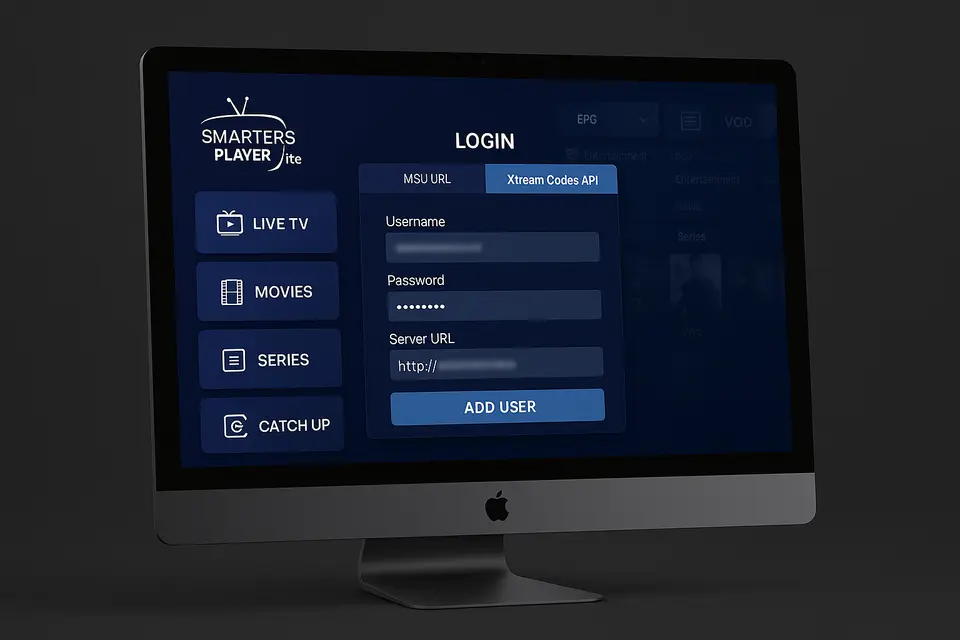
Smarters Player Lite-ni kompyuter uchun yuklab oling
Rasmiy o'rnatuvchini yuklab oling
Ishonchli manbalardan EXE yoki DMG o'rnatuvchilarini yuklab olish uchun rasmiy IPTV Smarters veb-saytiga tashrif buyuring.
O'rnatish jarayoni
O'rnatuvchini ishga tushiring va ko'rsatmalarga amal qiling, dasturni Mac-dagi tegishli papkaga joylashtiring.
Boshlang'ich konfiguratsiya
- Smarters Player Lite dasturini kompyuteringizda ishga tushiring.
- Shartlarni qabul qiling.
- "Yangi foydalanuvchi qo'shish" yoki shunga o'xshash narsani tanlang.
- Xtream kodlaringizni yoki M3U URL manzilingizni kiriting.
- Saqlang va ilova kanallar ro'yxatini yuklashini kuting.
Xbox va MAG Box konfiguratsiyasi
Xbox IPTV sozlamalari
Mos keladigan media pleyerlar uchun Microsoft Store’dan foydalaning yoki Edge brauzeri orqali veb-asosidagi IPTV yechimlariga kiring.
MAG Box portal konfiguratsiyasi
IPTV xizmatingiz tomonidan taqdim etilgan portal URL manzilini MAG oynasi sozlamalariga kiriting.
Universal sozlash ish jarayoni
Ishonchnomangizni to'plang
IPTV provayderingizdan sozlash uchun zarur bo'lgan barcha ma'lumotlarni to'plaganingizga ishonch hosil qiling:
- M3U URL manzili yoki yuklab olinadigan fayl manba
- Xtream kodlari ma'lumotlari manba
- Dastur qo'llanmasi uchun EPG URL manzili manba
O'yinchingizni tanlang
Smarters Player Lite, IPTV Smarters Pro yoki boshqa variantlar orasidan tanlang iptv xtream pleyeri sizning afzalliklaringiz asosida.
Sozlang va sinab ko'ring
Tanlangan pleyeringizga hisob ma'lumotlarini kiriting va turli kanallar bo'ylab uzatish sifatini tekshiring.
Umumiy muammolarni bartaraf etish
Ulanish va kirish bilan bog'liq muammolar
Barcha URL manzillarini ikki marta tekshiring va obunangiz faol ekanligiga ishonch hosil qiling. Hisob ma'lumotlaringizdagi har qanday xatoni tuzating.
Ijro etish va ishlash muammolari
Agar buferlash vaqtiga duch kelsangiz, internet tezligingiz va ulanish ishonchliligingizni baholang.
Qurilmaga xos yechimlar
Ba'zi qadamlar qurilmaga qarab farq qiladi, masalan, yon tomondan yuklanadigan ilovalar uchun Firestick-da Tuzuvchi sozlamalarini yoqish.
Xavfsizlik va huquqiy mulohazalar
IPTV ilovalarini har doim tasdiqlangan manbalardan yuklab oling. Maxfiylik uchun VPN dan foydalaning va IPTV dan foydalanishga oid mahalliy qonunlarga rioya qiling.
Savol-javoblar
IPTV nima?
IPTV Internet Protocol Television degan ma'noni anglatadi, bu sizga an'anaviy eshittirish usullari o'rniga internet orqali kontentni tomosha qilish imkonini beradi.
Eng yaxshi IPTV pleerini qanday topsam bo'ladi?
Eng yaxshi IPTV pleyerini topish uchun M3U va Xtream kodlari bilan mosligini, shuningdek, foydalanuvchilar uchun qulay interfeyslar va ijobiy sharhlarni qidiring.
Smart TV-larga IPTV ilovalarini o'rnatishim mumkinmi?
Ha, ko'plab Smart TV'lar o'zlarining ilova do'konlaridan yuklab olish mumkin bo'lgan IPTV ilovalarini qo'llab-quvvatlaydi.
IPTV qonuniymi?
IPTVning qonuniyligi kontent provayderiga va ular tomonidan tuzilgan litsenziya shartnomalariga bog'liq. Xizmatingizning muvofiqligini har doim tekshirib turing.
IPTV xizmati ishlamasa nima qilishim kerak?
Agar IPTV xizmatingiz ishlamayotgan bo'lsa, internet ulanishingizni tekshiring, obunangiz faol ekanligini tasdiqlang va ilovangizdagi sozlamalarni ko'rib chiqing.