
The best live TV streaming service is the one that fits your viewing habits, connection, and household, not simply the one with the longest channel list. For the best IPTV provider, compare channel selection, stream stability, safety, plan terms, and simultaneous connections. Plan for roughly 15-20 Mbps for stable HD streaming or 30 Mbps or more for 4K.
It makes sense to focus on price and channel count first. But a low-cost plan can disappoint if streams buffer, the channels you actually watch are missing, or one connection can’t serve your household. Picture quality also depends on your internet connection and the stream being delivered.
Nexott is the most stable IPTV — watch every match without buffering
This guide explains how to weigh the essentials and compare around ten service options without losing sight of day-to-day performance. You’ll learn what to look for in streaming quality, channel range, safety, pricing, and device connections, then use a simple decision guide to narrow down the right fit.
Key Takeaways
- Match the channel lineup to the sports, international programming, and shows you actually watch.
- Assess stream quality by considering connection demands and how reliability affects live viewing.
- Look beyond channel counts to compare the relevance of on-demand libraries and catch-up options.
- Consider legal access and account safety alongside picture quality and plan features.
- Choose a subscription term and number of simultaneous connections that fit your viewing habits and household.
What is the best live TV streaming service?
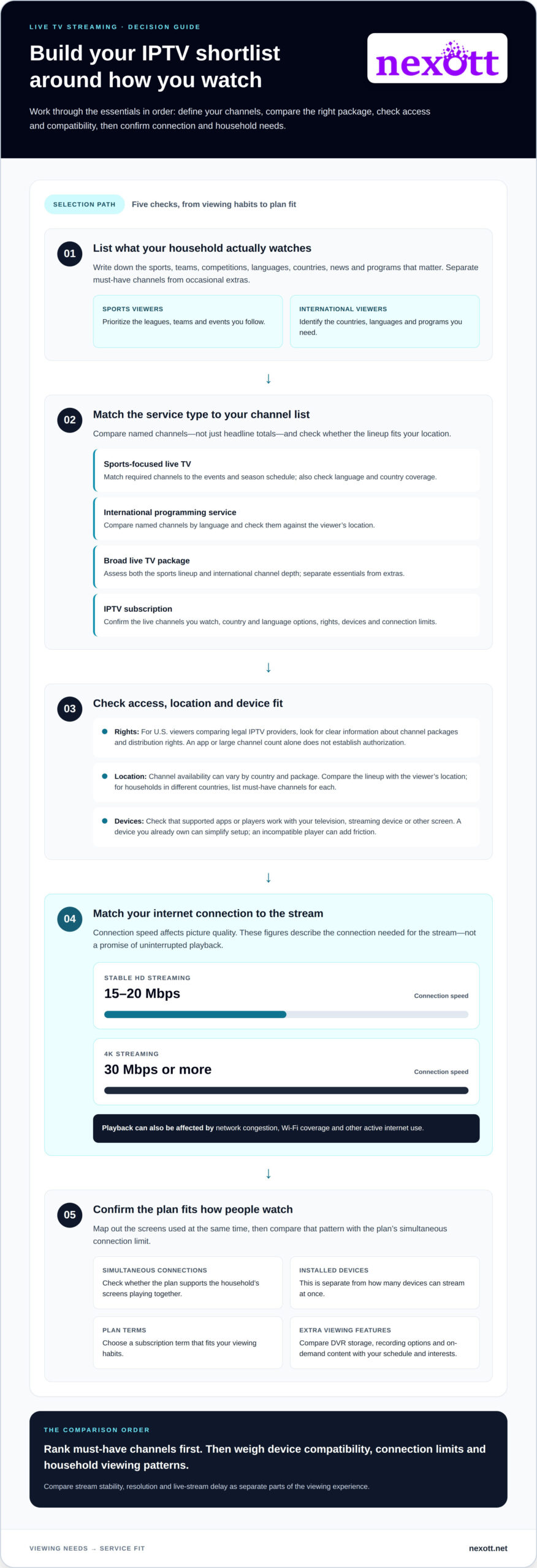
The best service for you depends on the sports, international channels, devices, and internet connection you rely on. Start by listing the competitions and programs you watch, then compare each service’s channel lineup with that list. A large catalog matters less if it misses the teams, languages, or programs you care about.
For U.S. viewers comparing legal IPTV providers, look for clear information about channel packages and distribution rights. An IPTV app or a large channel count alone does not show whether a service is authorized to offer those channels.
Sports viewers should prioritize the leagues, teams, and events they follow, then check whether the service carries the channels they need. International viewers can use the same approach: identify the countries, languages, and programs that matter, then compare channel names. A household seeking both live sports and international news should weigh those categories separately instead of relying on a headline channel total.
Your viewing setup matters, too. Match the service’s supported apps or players to your television, streaming device, or other screen before choosing a plan. Using a device you already own can simplify setup, while an incompatible player can add friction. If several people watch, check the plan’s simultaneous connection limit against the household’s viewing habits.
Connection speed affects picture quality. Plan for roughly 15-20 Mbps for stable HD IPTV streaming, and 30 Mbps or more for 4K IPTV streaming. Those figures describe the connection needed for the stream, not a promise of uninterrupted playback. Network congestion, Wi-Fi coverage, and other active internet use can also affect what appears on screen.
For international viewing, channel availability can vary by country and package. Compare the lineup with the viewer’s location, rather than relying only on broad regional claims. If household members watch from different countries, list the must-have channels for each location before deciding whether one service meets both needs.
| Service option | Sports fit | International fit | Best comparison step |
|---|---|---|---|
| Sports-focused live TV | Prioritize events and team channels | Check language and country coverage | Match required channels to the season schedule |
| International programming service | Check specific sports coverage | Compare named channels by language | Match channels to the viewer’s location |
| Broad live TV package | Assess the sports lineup | Review international channel depth | Separate essentials from extras |
| IPTV subscription | Confirm the live channels you watch | Compare country and language options | Consider rights, devices, and connections together |
Choose the best IPTV provider by ranking must-have channels first, then weighing device compatibility, connection limits, and household viewing patterns.
Streaming quality, reliability, and buffering
A clear picture matters, but live viewing also depends on consistent stream delivery. A sudden drop in resolution, a frozen frame, or delayed audio can disrupt a match or news broadcast. Compare resolution, playback stability, and live-stream delay: each affects a different part of the experience.
Buffering occurs when playback pauses while the stream catches up. You may notice it during a popular match, when several people share the same internet connection, or when Wi-Fi coverage is weak. The cause may be the home network, the device, or stream delivery. A fair comparison considers all three instead of treating every interruption as a service problem.
Latency is the delay between a live event and its appearance on screen. During a game, even a short delay can mean a phone alert reveals a goal before the television does. Network routing, stream processing, and playback settings can all affect latency. Resolution and latency are separate criteria, so a sharp picture does not necessarily mean a near-live broadcast.
One forum user reported watching derby matches through an unnamed IPTV service for six months without problems. That is one person’s experience, not a guarantee for every household or event. Reliability can vary with the connection, device, viewing time, and channel. Compare stated features with the viewing conditions that matter to your household.
IPTV services can differ in DVR storage, simultaneous streams, and on-demand access. Compare recording options with your schedule, check how many screens can play at once, and see whether the library includes the content you want. These features add convenience, but they do not replace stable live playback.
Before choosing a connection limit, map out how your household typically watches. One person may watch a live game while another streams a different channel in another room. A plan’s connection allowance determines whether that pattern is supported. It is separate from the number of devices on which an app can be installed or opened.
- Resolution: Compare HD and 4K availability with your screen and connection.
- Stability: Consider playback consistency during live events, not only on-demand viewing.
- Latency: Assess whether live sports need to appear close to real time.
- Household use: Match simultaneous stream limits to the screens used together.
Use these criteria to focus your comparison on the viewing experience you need, not just headline resolution. If connection limits are a deciding factor, compare IPTV plan options by the number of simultaneous screens your household uses.
Channel selection and on-demand libraries
Start with programs you will actually watch. Separate must-have channels from occasional extras, then compare services against your list. A sports fan might prioritize live event channels, while a household following international news may value particular languages. A large channel total may look impressive, but it does not show whether the lineup fits your viewing habits.
Which IPTV providers offer local broadcast channels in your area? It depends on whether the service’s lineup includes stations for your location. Compare the specific station names available there rather than assuming a national package includes nearby broadcasts.
Named channels make comparisons more precise. If you watch ESPN, BBC World News, or a regional-language channel, add it to your must-have list and look for that exact listing. Similar categories are not interchangeable: a general news station may not replace international coverage, and a sports channel may not carry the event you follow. Check the channel name and its role in your viewing routine.
Check local coverage separately. Station lineups can vary by location, so a channel available in one market may not appear in another. If you rely on local news, compare the specific station rather than a general “news” category. For viewing across countries, note the required country and language beside each channel.
On-demand libraries add flexibility, but title counts alone can obscure important differences. Compare the types of programs available, how easy titles are to find, and whether the library suits everyone in the household. One family might value children’s programs and films, while another viewer prioritizes documentaries or international dramas. Search tools and category organization also affect how quickly you can find a title.
Distinguish on-demand viewing from catch-up television. An on-demand library offers titles you can select outside a live broadcast schedule. Catch-up lets you replay eligible broadcasts after they air. Each serves a different need: catch-up may help when you miss an evening program, while an on-demand selection suits a film night.
- List essentials: Write down the channels, languages, and programs your household watches.
- Compare exact names: Distinguish a specific station from a broad category such as sports or news.
- Review local coverage: Match local station listings to the viewer’s location.
- Assess library fit: Compare genres, searchability, and catch-up access against real viewing habits.
Use your shortlist to compare lineup depth with everyday usefulness. One household may prioritize sports, local news, and a preferred language; another may put films and children’s programs first. Rank the essentials before weighing extra channels, so your choice reflects what viewers will actually watch.
Legal and safety considerations
IPTV describes how television reaches a screen; the term alone does not establish who is authorized to distribute each channel. Treat channel rights and account security as separate checks. A familiar station name or logo does not prove that a service has permission to offer its programming. Look for clear information about the provider and its channel packages.
For a practical review, compare the provider’s identity, package description, and payment process. A recognizable business name, consistent plan terms, and clear renewal details make an offer easier to understand. Be cautious of pages promising every premium channel without explaining the package. A very broad lineup is not proof of authorized access.
Protect your account by creating a unique password for the streaming service instead of reusing one connected to email or banking. If a service or player requests permissions unrelated to playback, such as access to contacts, consider why before granting them. Keep the app and device software updated through their standard update settings.
Take similar care with payment details. Before entering card information, review the checkout terms for the plan, renewal, and cancellation. The charge should match the amount shown at checkout. Never send card numbers, passwords, or verification codes in response to an unsolicited message. A request for your account password in a social media chat, for example, is a warning sign, not a normal payment step.
Protect the viewing device as well as the account. Install apps from sources you recognize and remove those you no longer use. On a shared television, sign out before giving away or selling the device. If a playback app asks for a service portal address or login details, use information provided through the service’s normal account process.
- Review the package: Check that channel names and plan terms are described clearly.
- Protect credentials: Use a unique password and keep verification codes private.
- Inspect permissions: Consider whether requested access relates to streaming.
- Secure payment: Read renewal and cancellation terms before checkout.
- Maintain devices: Update software and remove unused applications.
These steps help you assess service claims and reduce account and device risks. They do not establish whether a channel package is authorized; that depends on the rights behind its distribution. Consider channel authorization, transparent terms, and sensible account safeguards together. A large catalog alone is not enough evidence.
Subscription pricing and simultaneous connections
Plan length changes how you compare IPTV costs. Subscriptions commonly run for 1, 3, 6, or 12 months. A shorter term suits viewers who want flexibility; a longer term may suit households committed to regular viewing. Compare the total charge and the period it covers, not just the amount shown beside a plan.
To compare plans with different terms, divide each total charge by the number of months covered. Then weigh the monthly equivalent against the included channels and features. A lower total, for example, may cover fewer months or include fewer simultaneous connections. Compare like with like before deciding which plan offers better value.
Free trials and cancellation policies differ by service. Read the terms to find out whether a payment method is required, when a trial converts to a paid subscription, when renewal occurs, and how to cancel. The trial’s length alone does not explain when charges begin or what cancellation involves.
Simultaneous connections matter when household members watch different programs at the same time. Someone watching a game on the living-room television while another streams a film on a phone needs a plan that supports both streams. Count the screens likely to play at once, not every device where an app could be installed.
Also distinguish simultaneous streams from device compatibility. A service may support televisions, phones, or tablets without allowing every screen to play at once under one subscription. The connection limit determines how many active streams the household can use together. It matters most when several people want different programs at the same time.
Renewal terms affect a subscription’s real cost. Check whether a plan renews automatically, when the next billing period starts, and how cancellation affects access. If you choose a longer term, for example, understand whether cancellation stops a future renewal or ends current access. These details help you match a plan to your viewing schedule.
- Compare equivalent terms: Calculate the cost per covered month from each plan’s total charge.
- Match connections to use: Consider how many screens stream different programs at once.
- Read trial terms: Note payment, conversion, renewal, and cancellation conditions.
- Review renewal details: Understand what happens at the end of the selected period.
Choose a term that fits your viewing routine, then match its stream limit to your household’s busiest viewing times. Compare IPTV subscription options by plan length and simultaneous connections.
NEXOTT IPTV Service
NEXOTT IPTV Service offers subscription options for viewers comparing channel access, viewing duration, and household needs. Its plans include 1 Month IPTV Subscription (1 Device), 12 Months IPTV Subscription (1 Device), and Multi-Device IPTV Plans. Choose based on how long you want access and how many screens need simultaneous viewing. IPTV Reseller Credits are available for people interested in reselling IPTV subscriptions.
These options give you a practical next step after weighing stream quality, channel selection, and connection limits. Match the plan type to your viewing setup and preferred subscription period. For plan details, contact NEXOTT IPTV Service.
Choose a Plan That Fits Your Viewing Priorities
Turn your comparison into a clear decision rule: decide which viewing needs are essential, which are flexible, and what trade-offs you can accept. This keeps an impressive channel count or polished feature list from outweighing what matters in your routine.
The best IPTV provider for your household is the one that fits your priorities and is straightforward to use. Keep your criteria in mind as you review plans, and revisit them if your viewing habits change. A shift in household schedules or preferred programs can change which plan suits you.
NEXOTT IPTV Service can be a next step if you’re ready to explore subscription options that match your viewing setup. Take the time to choose deliberately, with your priorities leading the decision. Contact NEXOTT IPTV Service to discuss the available options.
Choose a plan that works for your household, then enjoy a viewing setup shaped around what you value.
Frequently Asked Questions
How do major IPTV services compare in channels, features, and streaming quality?
Compare the channels you watch, supported features, and picture quality rather than relying on catalog size alone. NEXOTT lists 30,000+ channels, 150,000+ VOD titles, 4K streaming, and four-day catch-up. Those figures describe its listed service features, but the best IPTV provider for you still depends on the channels and viewing functions that matter in your household. Check specific programs and playback needs against the package details.
Which services include sports, regional sports networks, and live events?
Sports coverage depends on the channels and events in each service’s lineup. Regional sports networks and event access can vary by package and viewer location, so compare the exact network names and competitions you want. A national sports channel, for example, may not carry the regional team coverage you follow. Listing your must-watch teams and events makes lineup differences easier to spot.
What devices and apps are compatible with leading IPTV services?
Compatibility depends on both the service and the apps supported by your device. NEXOTT describes compatibility with a wide range of devices and IPTV players, including Plex; compatible apps listed by the service include Smarters IPTV Pro, Flix, SET IPTV, and NET IPTV. Search your television, phone, or streaming device’s app store for the player you plan to use, then compare it with NEXOTT’s supported options.
How do reputable IPTV providers demonstrate that they are licensed and legal in the United States?
Look for clear information about the provider, its channel packages, and the rights behind the content. A channel list alone does not prove authorization. NEXOTT states that it does not own, host, or control video or audio content; it provides subscription activation and credentials. Its terms state that the service operates from Panama and that disputes are subject to Panamanian law. Viewers are responsible for complying with local laws.
What are the risks of using unauthorized IPTV services, including scams and malware?
Unauthorized or deceptive services can expose viewers to misleading offers, unsafe payment requests, or apps that create security risks. Avoid sharing passwords or payment details through unsolicited messages, and use apps from sources you recognize. Read renewal and cancellation terms before paying. An unexpected chat requesting account credentials, for example, should prompt caution. Use different passwords for your streaming, email, and payment accounts.
What internet speed is recommended for reliable IPTV streaming?
Plan for roughly 15-20 Mbps for stable HD streaming and 30 Mbps or more for 4K. NEXOTT lists a minimum stable connection speed of 16 Mbps. These figures don’t account for every household’s simultaneous internet use. Video calls, downloads, and other streams share capacity, so a busy home may need more available bandwidth than a single viewer watching one program.
Which IPTV providers have the best customer support and service reliability?
No single provider is best for every viewer; compare support access and how clearly service terms explain interruptions or troubleshooting. NEXOTT lists customer support through live chat, WhatsApp, and email, with 24/7 availability. Reliability also depends on the household’s connection, device, and stream conditions, so support access and viewing performance are separate considerations. Choose a service whose support channels and published terms match your needs.