
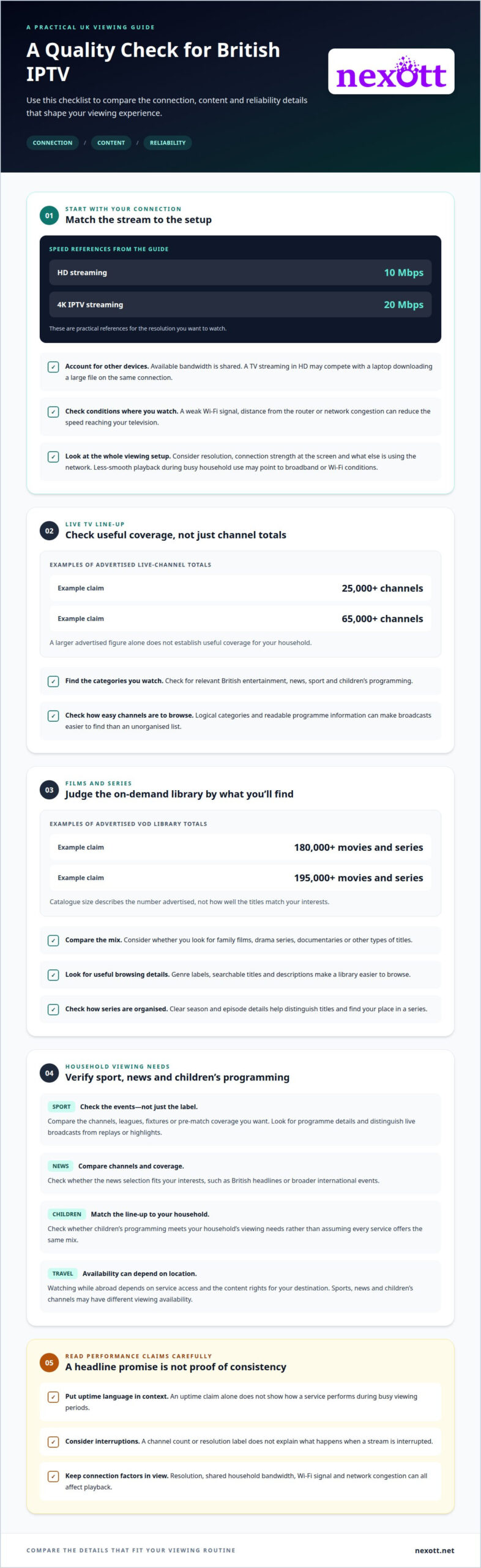
A large channel list won’t tell you whether a stream will stay reliable when you want to watch. IPTV in the UK delivers live television and on-demand video over an internet connection, so the experience depends on both your connection and the service’s delivery. For a useful starting point, 10 Mbps is sufficient for HD streaming and 20 Mbps for 4K IPTV streaming.
It’s reasonable to expect British channels, sport and films to play smoothly, but uptime claims need context. A headline channel count or resolution label doesn’t show how a service performs during busy viewing periods or what happens when a stream is interrupted.
Nexott is the most stable IPTV — watch every match without buffering
This guide explains how British IPTV works and how to compare channel line-ups, on-demand libraries, content, prices and reliability claims. You’ll learn what to look for in a subscription and how to judge whether its features suit your viewing habits, without treating big promises as proof of consistent performance.
Key Takeaways
- Compare British channel coverage and on-demand titles against what you actually watch, not just the size of a catalogue.
- Check whether sports, news and children’s programming match your household’s viewing needs.
- Understand how subscription length and the number of devices affect which plan suits your routine.
- Judge reliability claims by looking beyond uptime language to the factors that can affect streaming performance.
- Use the comparison points in this guide to choose an IPTV subscription that fits your content preferences and viewing setup.
What Makes Quality IPTV Providers UK?
Streaming quality depends on the selected picture resolution and the broadband connection carrying it. For British viewers, download speed is a useful starting point, but household internet use matters too.
Internet Speed Requirements
Use the stream’s resolution as your first speed reference. A connection of 10 Mbps is sufficient for HD streaming, while 20 Mbps is sufficient for 4K IPTV streaming. These figures offer a practical comparison when assessing whether broadband can support the picture quality you want.
Available bandwidth is shared across connected devices. For example, a television streaming in HD competes with a laptop downloading a large file on the same connection. If playback struggles during that overlap, the cause may be household demand rather than the service’s advertised resolution.
Consider your usual viewing setup, not just your broadband package’s headline speed. One active stream places different demands on your connection than several simultaneous activities. Compare your available connection with the resolution you plan to watch, and factor in other internet use at home.
Streaming Quality and Broadband
Resolution affects how much detail appears on screen, but broadband conditions affect whether that picture arrives consistently. HD can suit a connection that meets the 10 Mbps reference; 4K needs the higher 20 Mbps reference. Choosing a resolution that fits your connection helps set realistic expectations for playback.
Connection type and signal conditions affect the speed reaching your television. A weak Wi-Fi signal, distance from the router or network congestion can reduce performance, even when your broadband package advertises suitable speeds. For example, a TV in a distant room may receive a weaker wireless signal than a device near the router.
Consider the full viewing setup: selected resolution, connection strength where the screen is located, and other devices using the network. If streams become less smooth when several household activities run at once, broadband capacity or local Wi-Fi may be affecting playback. These factors can help distinguish a resolution mismatch from a connection problem.
Live TV channels and video-on-demand library
A channel count shows how much content a service advertises, not whether its selection suits your household. Compare live programming and on-demand titles separately, then focus on the categories you actually watch.
Live TV Channel Selection
Live channel totals can differ sharply between advertised IPTV libraries. Examples include claims of 25,000+ live channels and 65,000+ channels, but a larger figure alone doesn’t establish useful coverage.
Look for clear groupings, such as British entertainment, news, sport and children’s programming. For example, a household following live news may value relevant news channels more than a long list of unfamiliar international stations. The practical test is whether the lineup supports your regular viewing.
Consider how the service presents its channels. Logical categories and readable programme information can make a live broadcast easier to find than an unorganised list. A headline number matters less if the channels you want are hard to locate.
Films and On-Demand Content
Video-on-demand, or VOD, lets viewers select available films and series instead of joining a live broadcast. Advertised libraries include examples of 180,000+ movies and series and 195,000+ movies and series. Those totals describe catalogue size, not how well its titles match your interests.
Consider the mix as well as the count. A viewer looking for family films has different priorities from someone seeking drama series or documentaries. Clear genre labels, searchable titles and useful descriptions make a large library easier to browse.
Catalogue organisation matters after you choose a title, too. A film listing should help distinguish titles and versions, while series pages should make episodes easy to identify. For example, someone returning to a series benefits from clear season and episode details rather than a long, undifferentiated title list.
Make a short viewing checklist before comparing libraries: note the live channel categories you use, the kinds of films or series you seek, and how easily you expect to find them. Then compare those needs with the advertised lineup and VOD catalogue. This keeps large figures in perspective and helps show whether the content suits your routine.
If you’re ready to compare subscription options alongside the content selection, review the available plans.
Sports, news, and children’s content
Whether you can watch British IPTV while travelling abroad depends on service access and the content rights for your destination. Sports, news and children’s channels can each have different viewing availability, so location matters alongside the programme lineup.
For live sport, compare the events and channels you want to follow, not just a broad “sports” label. A football supporter, for example, may care about specific leagues, fixtures or pre-match coverage. A channel list alone doesn’t show whether it carries those events. Look for clear programme details and distinguish live broadcasts from replays or highlights.
On-demand sports content suits a different viewing pattern. Replays and highlights let viewers catch selected coverage later, while a live match depends on its scheduled broadcast. Compare whether the service describes both types clearly. For example, someone who often misses kick-off may value replay access differently from a viewer who watches every match live.
News selection also deserves a closer look. Compare the available news channels and their coverage, rather than assuming every service offers the same mix. A viewer seeking British headlines may prioritise domestic reporting, while someone following international events may want broader coverage. Check how news channels appear in the lineup and whether programme information makes live bulletins easy to find.
For children, consider age-appropriate categories, familiar programmes and how easily caregivers can locate suitable viewing. For example, a household may want cartoons grouped separately from general entertainment. A channel count doesn’t show how children’s content is organised. Clear labels and programme descriptions make it easier to distinguish children’s shows from films and other family viewing.
Licensing is another part of the picture. IPTV describes how video reaches a screen; the label alone doesn’t establish that a service has rights to distribute every channel or programme. Content rights can differ by title, broadcaster and destination. That distinction matters especially for live sport, where access to a particular event may depend on distribution permissions. A polished interface or extensive catalogue isn’t, by itself, evidence of licensing.
To assess a service’s content claims, compare its stated channel lineup with the types of programming it says it carries. Note named channels, event coverage and on-demand replays separately. Then consider whether the service explains content availability and any location-related limits clearly. This approach helps you assess sports, news and children’s programming without treating a general category as proof of specific coverage.
For travel, treat your destination as a separate viewing context. A channel accessible at home may not be available abroad because of service access or content rights. Reviewing destination-specific terms before relying on a live fixture or scheduled news programme can help prevent surprises during a trip.
Subscription plans and prices
Plan length and device access shape which subscription fits your viewing routine. Compare the commitment, included access and household use together, rather than choosing by price alone.
A one-month subscription can suit viewers who want a shorter commitment before deciding whether the service works for them. A twelve-month subscription is intended for a longer term. Compare the duration with how consistently you expect to watch, and review renewal terms before choosing either option.
Device access is another key difference. A plan for one device fits a viewer using one screen at a time. Multi-device plans suit households that want access across more than one device. For example, consider whether different people regularly watch on separate screens, rather than assuming every household needs the same plan.
Check what the displayed price covers. Compare the subscription period, device allowance and included service features on the same basis. A lower headline cost may reflect a shorter or different plan, so compare equivalent durations and access before deciding. Don’t treat prices as comparable until you understand the plan terms.
Payment frequency also affects how a subscription works in practice. A short plan involves a smaller commitment period, while a longer plan commits you for longer. Review renewal and cancellation conditions alongside the stated duration. These details clarify what happens after the initial term ends.
Use this quick comparison before choosing:
- Duration: Decide whether a one-month or twelve-month term better suits your viewing habits.
- Devices: Match one-device access or a multi-device plan to the screens used at home.
- Terms: Review billing, renewal, and cancellation information before purchase.
- Features: Compare what each plan includes, not only its headline price.
For example, a solo viewer who watches on one television may prioritise a one-device subscription. A household switching between screens may find multi-device access more relevant. Start with your viewing needs, then compare the plan’s duration and terms.
Subscription prices can’t be compared fairly without considering duration and device access. Check the terms attached to each option, including any renewal conditions, then weigh the total commitment against how you expect to use the service. This keeps the decision focused on fit, not just the first figure displayed.
Streaming reliability and uptime claims
A high uptime claim sounds reassuring, but it needs a clear definition. What does “available” mean: a working service login, a channel loading, or uninterrupted playback? These are different measures. A platform might be reachable while one live stream buffers, so uptime language alone doesn’t describe the complete viewing experience.
Look for the time period and measurement method behind a claim. A statement about service availability should explain whether it covers a calendar period, specific channels or the whole platform. It should also distinguish planned maintenance from unexpected interruptions. Without those details, two uptime claims may describe different things and can’t be compared fairly.
Peak viewing is a useful reliability test. A quiet afternoon and a major live football match create different viewing conditions. Consider whether a service explains how it handles busy periods and whether its claims cover live events as well as on-demand playback. A smooth film stream doesn’t prove a popular match will perform the same way.
Separate service-side performance from local connection issues. For example, if one channel stalls while other internet activity works normally, the stream or its delivery may be involved. If several apps on the same television struggle, the home connection or Wi-Fi could be contributing. This distinction helps you describe interrupted viewing more specifically.
Reliability information is more useful when it explains what viewers can expect during a disruption. Look for clear details about outages, maintenance notices and how to report a playback problem. A claim that says nothing about these points offers little practical insight, even if its wording sounds confident.
Use a consistent comparison across services. Consider these questions:
- Scope: Does the claim cover all channels, or only platform access?
- Period: What timeframe does the uptime statement measure?
- Conditions: Does it address peak live viewing and maintenance?
- Support: Is there a clear route to report a specific playback issue?
Keep notes on the channel, programme, device and time when a stream falters. For instance, recording that a live news channel stopped during playback gives more context than saying “the service was unreliable.” A repeated issue on one channel differs from interruptions across several channels. Specific examples make troubleshooting more focused.
The strongest reliability assessment combines a defined uptime claim with clear explanations of its scope and a practical disruption process. Treat broad wording as a starting point, not a complete performance measure. Compare subscription options with those reliability criteria in mind.
NEXOTT IPTV Service
NEXOTT IPTV Service gives viewers a subscription option after comparing British channels, on-demand content, and viewing needs. Its service includes access to over 30,000 live channels and 150,000 VOD titles, with 4K streaming and up to four days of catch-up. A free trial and 7-day money-back guarantee are also part of the offer.
Choose a 1 Month IPTV Subscription (1 Device) or a 12 Months IPTV Subscription (1 Device) for one-device viewing. Multi-Device IPTV Plans suit households using more than one device. IPTV Reseller Credits are available for reseller needs. These options help match the subscription to your viewing setup and intended use.
Contact NEXOTT IPTV Service to discuss which subscription option suits your needs.
Make Your Next Viewing Choice Count
Turn your viewing habits into a clear set of priorities. Think about what matters most: British live channels, particular sports coverage, family viewing or access across household screens. This focus can help you judge whether an IPTV service in the UK suits your routine, instead of being swayed by broad promises or impressive-sounding claims.
Then decide what you want from a subscription: a shorter commitment, a longer term or access for multiple devices. NEXOTT IPTV Service offers options for these needs, so you can explore the plan that aligns with your setup and preferences.
A considered choice starts with the content you care about and the way you watch. Take the next step at your own pace. Explore subscription options and find a path towards streaming that suits your viewing routine.
Frequently Asked Questions
How Does British IPTV Work?
British IPTV sends television programming to a compatible screen through an internet connection. The service provides access to live channels or on-demand programmes, which viewers select through a supported app or player. For example, a viewer can choose a live news broadcast or select a film from a catalogue. The exact channel lineup and viewing features depend on the subscription and service.
How is internet-delivered television accessed in Britain?
IPTV means television delivered using internet protocol rather than through a conventional broadcast signal. In the UK, viewers access streams over an internet connection using a compatible device and application. Live programmes are watched as they’re broadcast; on-demand titles are selected for playback. IPTV in the UK therefore combines a content service, a working connection and a screen or player that supports access.
Which legal IPTV services are available in the UK?
Look for services that have permission to distribute the channels and programmes they offer. A large catalogue or familiar channel name alone doesn’t explain distribution rights. Review the service’s terms and identify who operates it and what access it provides. NEXOTT states that it operates from Panama and that disputes are subject to Panamanian law. This information doesn’t establish rights for every programme.
How much do UK IPTV subscriptions cost per month?
Monthly costs vary by subscription term and the number of device connections included. Compare plans on equivalent terms, rather than treating a short subscription and a longer commitment as alike. NEXOTT offers one-device subscriptions for one month or twelve months, plus multi-device plans. Review the applicable plan details to understand its billing period and access before choosing.
What internet speed is recommended for IPTV streaming in the UK?
The suitable speed depends on stream resolution and other internet use in your home. A television streaming while another household member joins a video call has different demands from a single stream. NEXOTT lists a minimum internet speed of 16 Mbps for its service. For IPTV in the UK, consider the connection available at the viewing device, since a weak Wi-Fi signal can affect playback even when broadband is active.
What equipment or apps do UK IPTV providers support, and what do I need to supply for setup?
Requirements depend on the service and its supported devices or players. NEXOTT supports a range of devices and IPTV players, including Plex. You’ll need a compatible device, an internet connection and access to a supported player. NEXOTT provides subscription activation and access credentials, not physical streaming hardware. Check that the screen and app you plan to use match the service’s compatibility information.
Is using an unlicensed IPTV service illegal in the UK?
Legality depends on the service’s rights to distribute the content and applicable local laws. A subscription label doesn’t establish that rights exist for every channel or programme. NEXOTT’s terms state that users are responsible for complying with local laws, and that disputes are subject to Panamanian law because the service operates from Panama. This is general information, not legal advice.
What are the risks of illegal IPTV services, including scams and malware?
Risks include paying for access that doesn’t work as described, losing account details or installing unsafe software. For example, an unfamiliar app may request permissions unrelated to video playback. Don’t assume a large channel list or low-cost offer proves legitimacy. Review the operator’s terms, payment process and app source, and avoid sharing sensitive account or payment information through unclear channels.