
An IPTV player can be legal to install and use because it doesn’t host or provide content. But the player’s legality doesn’t establish whether a service has the rights to stream its channels and titles. Choosing the best IPTV subscription for a Smart TV means looking beyond the app to the provider and the content it delivers.
It’s reasonable to want a clear answer before subscribing. IPTV brings live channels and on-demand viewing to a Smart TV, but the experience depends on more than the screen: the player, service features, and subscription terms all matter.
Nexott is the most stable IPTV — watch every match without buffering
This guide explains the distinction between a player and a content service in the USA, what to look for in an IPTV player, how subscription pricing is structured, and which provider features can shape your decision. Use it to assess compatibility, catch-up options, and streaming quality, then choose a Smart TV subscription that suits your viewing habits.
Key Takeaways
- Separate the IPTV player from the streaming service: an app’s legality doesn’t determine whether the service has the rights to its content.
- Match the player’s program guide, catch-up, recording, and favorites tools to the way you watch.
- Compare subscription terms and device limits, and focus on what the plan includes rather than price alone.
- Check how Smart TV compatibility, streaming quality, and available content fit your viewing setup.
- Use the provider and player features together to choose a subscription that works for your TV and viewing habits.
Electronic program guide and catch-up features
Channel lineups, sports, local stations, and DVR options depend on the IPTV service and its features. An electronic program guide shows scheduled listings, but it doesn’t establish that a particular station or recording option is included.
Program Guide Access
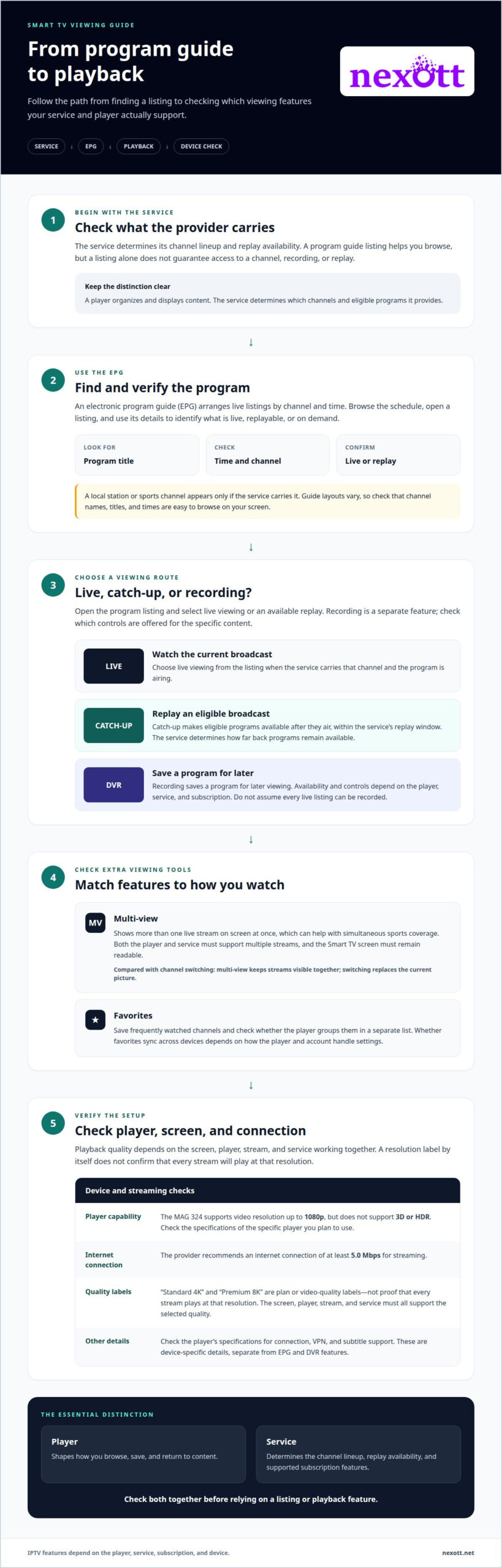
An electronic program guide, or EPG, organizes live TV listings by channel and time. Use it to see what’s playing, check upcoming programs, and open listings for details. For example, you can check a program’s start time before choosing a channel. Guide layouts vary by player, so consider whether you can browse channels and schedules easily.
Guide listings are useful only when they match the service’s channel lineup and schedule. A local station or sports channel appears only if the service carries it; a listing alone doesn’t guarantee access. Look for clear program titles, times, and channel names. These details help distinguish a live broadcast from a replay or on-demand movie.
Catch-Up and Multi-View Options
Catch-up TV lets viewers replay eligible programs after their live broadcast, within the service’s replay window. It can help if a series episode or game starts before you’re ready to watch. The EPG may show which programs can be replayed, while the service determines how far back they remain available. Check how catch-up appears in the guide before relying on it.
Multi-view displays more than one live stream on the screen at once, which can help you follow simultaneous sports coverage. Its value depends on whether the player and service support multiple streams and whether the Smart TV screen remains readable. Compare it with ordinary channel switching: multi-view keeps streams visible together, while switching replaces the current picture.
DVR recording is different from catch-up. Recording saves a program for later viewing, while catch-up replays content made available by the service. Availability and controls depend on the player and subscription. Look for recording controls beside the program listing, then check whether saved items appear separately from replayable broadcasts. Don’t assume every live TV listing can be recorded.
Player specifications can also shape the viewing experience. The MAG 324 supports video resolution up to 1080p, but doesn’t support 3D or HDR images. Device capabilities can vary, so check the player’s specifications for connection, VPN, and subtitle support. These are device-specific details, not EPG or DVR features, so match the player to the capabilities you need.
For streaming, the provider recommends an internet connection of at least 5.0 Mbps. Use the EPG to find a program, open its listing, and select live viewing or an available replay. Then check whether recording or multi-view controls appear for that content. Sports, local stations, movies, and series still depend on the service’s lineup and feature support.
Player features such as EPG, recording, and favorites
An IPTV player shapes how you browse, save, and return to content on a Smart TV. Separate interface tools from subscription features: a player menu can organize channels, but it doesn’t determine which streams or recording options the service provides.
Start with the electronic program guide (EPG). Check how the channel list, schedule, and program details appear on your screen. For example, a guide that shows channel names beside program times can make browsing easier than a list of channel numbers alone. Then see how easily you can return to playback.
Favorites can reduce scrolling. Add a frequently watched news channel or sports station, then see whether the player groups it in a separate list. A useful favorites menu makes saved channels easy to find and remove. Don’t assume favorites sync across devices; that depends on how the player and account handle settings.
Recording needs a separate check. Find out whether the player shows a record control for a program and how saved items appear afterward. Recording may depend on the service, player, and device together. A Smart TV interface, Firestick app, and external player can offer different controls, even when they connect to the same subscription.
Resolution labels need the same distinction. “Standard 4K” and “Premium 8K” describe plan or video-quality labels, not automatic proof that every stream plays at that resolution. The screen, player, stream, and service must all support the selected quality. A label alone also says nothing about EPG, recording, or favorites.
For a Formuler Z8 or Formuler Z7+, use the exact model name when comparing the player’s stated features with your setup. Focus on the EPG layout, favorites controls, recording workflow, and supported playback quality. Don’t infer a capability from the model name alone. Confirm that the player works with the service and the Smart TV or display you plan to use.
Use this quick comparison before settling on a player:
- Guide: Can you browse channels and program details comfortably?
- Favorites: Can you save and quickly reopen preferred channels?
- Recording: Does the service and player provide the recording controls you need?
- Quality: Do the plan, stream, player, and screen align with the resolution label?
For example, a viewer who mostly watches a short list of channels may value favorites more than recording. Someone using a Firestick should assess its specific player interface rather than assume it matches a Formuler device. Match the controls to your viewing habits, then choose a plan and player combination that supports them.
IPTV legality and VPN use
IPTV delivers television over an internet connection instead of through traditional broadcast or cable. On a Smart TV, an IPTV player connects to a service and displays its live channels or on-demand content.
In the USA, IPTV players are legal to install and use because they don’t host or provide content. That doesn’t settle whether a streaming service is authorized to distribute its channels, movies, or series. The key distinction is between the player and the provider’s rights to the content.
For Samsung, LG, and Android TVs, connect the television to the internet, open its app store, and install a compatible IPTV player. Then enter the service’s setup details in the player. Menus and app availability vary by TV system, so the steps and player choices may differ across Samsung, LG, and Android models.
A VPN creates an encrypted connection between a device and a VPN server. It doesn’t grant permission to stream content or change a service’s rights. A VPN also can’t make an unsupported player compatible; for example, the MAG 322 doesn’t support VPNs.
Licensing concerns relate to the content service, not simply the app icon on a television. A provider’s claims about channel access don’t by themselves demonstrate that it has distribution rights. Treat broad claims with care, especially if the service provides little information about its content sources or terms.
Unlicensed subscriptions can carry practical risks. Access may be interrupted, channels may disappear, and payment or account information may be exposed through a deceptive service. Warning signs can include unclear terms, pressure to pay immediately, or requests for payment details through an unusual channel. These signs call for caution, but don’t alone prove a service is unlawful.
Before paying, review the provider’s terms, payment process, and explanation of its content offering. Look for consistent service details, clear account instructions, and understandable renewal or cancellation terms. Avoid sharing passwords or payment information through unexpected messages. A stable connection and polished app don’t establish content authorization.
For example, installing a player from a Smart TV app store explains only how the software reaches the screen. It doesn’t answer who supplies the sports channels or whether the provider may distribute them. Keep these checks separate: assess the player’s compatibility, then review the service’s content and terms.
That distinction helps you make an informed subscription choice. IPTV is a delivery method, the player is an interface, and the provider supplies access to streams. Evaluate each part clearly without treating a VPN, television brand, or app as proof of a service’s rights.
IPTV player subscriptions and pricing
An IPTV player and an IPTV service subscription are separate things. The player is software for browsing and streaming; the subscription provides access to a service. On an Android TV, for example, installing a player doesn’t automatically include live channels or movies.
Subscription costs vary with the plan’s duration, device allowance, and included features. Compare those details rather than judging a plan by its headline price alone. A longer term changes the overall commitment, while a multi-device plan suits a different household setup than a single-device plan.
One IPTV subscription supports only one device connection at a time. That matters if you switch between a Smart TV and an Android device: simultaneous viewing and switching between devices aren’t the same. Read the plan’s device terms and match them to how people in your home watch.
Before choosing a plan, separate the service charge from any player-related charge. Some players may require a separate purchase or subscription, while the IPTV service covers its own access terms. The plan description should make clear what you’re paying for, the device allowance, and whether the term renews.
Use this comparison to focus on the details that affect value:
- Term: Compare the commitment period with how long you expect to use the service.
- Devices: Match the allowance to the screens you intend to use.
- Features: Check whether the service includes the channels and viewing tools you want.
- Player: Confirm that the app works with your television or Android device.
Your IPTV setup should fit your viewing routine, not just sound appealing in a promotion. Someone watching on one television may need a different device allowance from a household streaming on separate screens. Internet access, supported devices, and the service’s content all shape how useful the plan feels.
To cancel and avoid unwanted charges, follow the cancellation method in your provider’s account or subscription terms, and do so before the next renewal date shown there. Save the confirmation and review the account afterward to ensure renewal is off. Cancellation steps depend on where you purchased the subscription, such as through a provider account or an app store.
Read renewal, cancellation, and refund terms before paying. Keep the receipt and account emails with your plan details. If a trial or introductory offer is available, note when it ends and how it transitions into a paid subscription. These steps help you understand the commitment before streaming begins.
Ultimately, the right plan balances term, device access, and useful features. Compare the subscription with the player separately, then choose an option that suits your Smart TV, Android devices, and internet setup.
IPTV service providers
For a US Smart TV, the best legal IPTV subscription is one from a provider authorized to distribute its content. IPTV players can be legal to install and use, but the player itself doesn’t establish a provider’s rights to channels or programs. When choosing the best IPTV subscription for Smart TV viewing, assess the service, not just the app.
Provider claims describe what a service advertises, not independent proof of content rights. One service in the market advertises more than 10,000 English and global channels, over 1,500 VOD movies and series, and streaming in 4K, Full HD, HD, 1080p, and 720p. Those figures describe its advertised catalog and formats. They don’t establish whether the provider has authorization to distribute each channel or title.
Compatibility is a separate decision. Samsung and LG smart TVs are listed among compatible devices, but that doesn’t establish support for every model or every IPTV player. Check the TV operating system and app compatibility for your setup. A service can support a brand while a particular television model lacks the app you intend to use.
Buffering also deserves a practical assessment. It can depend on the internet connection, selected stream, player, and device. A 4K label doesn’t guarantee smooth playback if the connection or screen cannot handle that stream. Consider resolution alongside supported devices, access terms, and the channels you actually plan to watch. That creates a more useful comparison than relying on a headline catalog total.
Use these criteria to compare providers:
- Rights: Look for a clear explanation of the provider’s authority to distribute its channels and programs.
- Lineup: Match advertised channels and on-demand content to your interests, such as sports, local stations, movies, or series.
- Compatibility: Assess the service and player against your specific Samsung, LG, or Android TV setup.
- Playback: Consider stream formats alongside your internet connection and screen capabilities.
A broad catalog may still omit a particular local station or sports event. For example, a household focused on local news should prioritize relevant stations over a large overall channel count. Sports fans may care more about specific events and replay features. The best IPTV subscription for Smart TV viewing depends on how well the provider’s lineup fits those priorities.
Before subscribing, read the plan terms for duration, device limits, renewal, and cancellation. Compare these with the content and compatibility details, rather than treating one feature as a complete measure of service quality. This helps you choose the best IPTV subscription for Smart TV use based on practical fit and transparent terms.
Explore available plans for your viewing setup by reviewing IPTV subscription options.
NEXOTT IPTV Service
NEXOTT IPTV Service offers IPTV subscriptions for viewers choosing a Smart TV setup. Its service includes access to over 30,000 live channels and 150,000 VOD titles, with 4K streaming and up to four days of catch-up.
Choose a 1 Month IPTV Subscription (1 Device) for a shorter commitment, a 12 Months IPTV Subscription (1 Device) for a longer term, or a Multi-Device IPTV Plan for viewing across devices. These options help match subscription duration and device access to your household’s viewing habits. IPTV Reseller Credits are available for readers interested in reselling.
If you’re ready to explore an IPTV subscription for your Smart TV, contact NEXOTT IPTV Service to discuss your viewing setup and plan options.
Make Your Smart TV Setup Work for You
Turn what you’ve learned into a setup that fits your viewing routine. Consider how you watch, which devices you use, and what matters most in your daily experience. The best IPTV subscription for your Smart TV should bring those choices together, not leave you sorting through features you won’t use.
Keep the distinction between a player and a content service in mind as you decide. A polished interface can make browsing easier, but your subscription choice should also reflect your expectations for access, compatibility, and provider transparency. Identify your priorities before selecting a plan.
NEXOTT IPTV Service offers different subscription options for individual and multi-device viewing. Explore the available plans and choose the next step that suits your setup. Explore IPTV subscription options and move toward a Smart TV experience built around the way you watch.
Frequently Asked Questions
Is an IPTV Subscription Legal in the USA?
IPTV players are legal to install and use because they don’t host or provide content, but a player doesn’t establish a service’s rights to its streams. NEXOTT provides subscription activation and access credentials, not video or audio content. NEXOTT operates from Panama, and its terms place disputes under Panamanian law. This isn’t legal advice; users are responsible for complying with local laws.
How Many Devices Does a Singe Subscription Support?
One IPTV subscription supports one device connection at a time. You can switch viewing from a television to another device, but using both simultaneously isn’t the same as switching. NEXOTT’s rule is one subscription for one device connection; simultaneous connections may result in username and IP address blocking. Choose a multi-device plan if your household needs more than one active screen.
What countries support the IPTV streaming platform?
NEXOTT serves users worldwide and markets its subscriptions primarily to customers in the United States. This broad reach doesn’t mean every service has identical availability or content in every country. Before streaming while traveling or living abroad, review the service’s terms and make sure your use complies with local laws. Country support and content access are separate considerations.
What do I prepare in order to receive IPTV Streaming TV?
Prepare a Smart TV or other compatible device, internet access, and an IPTV player that works with your setup. After payment confirmation, NEXOTT emails account credentials; check your inbox and spam folder for the setup information. Keep those credentials available when configuring the player. A stable connection and compatible app help you complete setup without traditional cable installation.
What are the current monthly prices, channel counts, and free trials for major IPTV services?
Monthly prices vary by provider, subscription term, and device allowance, so there’s no single rate across IPTV services. Compare live-channel counts separately from on-demand movie and series totals, since they describe different libraries. Review trial and refund terms too: a free trial lets you evaluate access before committing, while a money-back policy applies after purchase under its stated conditions.
What internet speed and equipment do you need for reliable IPTV streaming?
For NEXOTT, the stated minimum is a stable internet connection of 16 Mbps. You’ll also need a compatible Smart TV or other supported device and an IPTV player that works with it. If playback buffers, first consider whether the connection is stable and whether other devices are using it heavily. A physical streaming box isn’t required by this setup information.
Which smart TV brands and models support each IPTV service?
Samsung and LG smart TVs are listed as compatible. Specific models are not identified.