What if a 4K label doesn’t guarantee a sharper picture? A 4k iptv subscription can support ultra-high-definition streaming, but the result depends on more than the plan. The specific channel or title, your internet connection, and your device all need to support the experience you expect.
It’s reasonable to want clear answers before you subscribe. A compatible screen alone won’t prevent buffering if your connection or app falls short, and a service’s 4K capability doesn’t mean every channel or on-demand title is in 4K. A few practical checks can help you distinguish useful details from broad claims.
Nexott is the most stable IPTV — watch every match without buffering
This guide explains what 4K IPTV means in everyday viewing, which internet, device, app, and connection factors can affect playback, and how to assess a service before committing. You’ll also see why content availability matters as much as resolution. NEXOTT offers plans with 4K streaming, access to more than 30,000 live channels and 150,000 VOD titles, plus up to four days of catch-up. Those figures describe content breadth and features, not a promise that every option is in 4K. A free trial and a 7-day money-back guarantee provide ways to evaluate the viewing experience under their stated terms.
Key Takeaways
- A 4K label refers to resolution, not a promise that every channel or title streams in 4K.
- Assess your connection under real household conditions, since Wi-Fi quality, network congestion, and simultaneous use can affect playback.
- Compare verifiable details about resolution, device support, catch-up, and trial terms instead of relying on promotional claims.
- Test live TV, on-demand titles, and catch-up separately to see how a 4k iptv subscription performs across different types of viewing.
- NEXOTT combines 4K streaming with a broad live and on-demand lineup and up to four days of catch-up, so you can evaluate the overall viewing experience.
What a 4K IPTV Subscription Actually Gives You
IPTV delivers compatible television video over an internet connection rather than through traditional broadcast or cable delivery. The term describes how video reaches your screen, not the resolution or quality of every program. This overview of Internet Protocol television (IPTV) explains the technology behind this internet-based approach.
With a 4k iptv subscription, the plan may support 4K playback, but that alone doesn’t tell you the resolution of a particular stream. The content itself must be available in 4K, and your screen and playback setup must be able to display it. Treat the plan’s 4K capability as one part of the picture, not a promise about every item in its library.
It also helps to distinguish the ways you watch. Live channels deliver scheduled programming as it airs. On-demand titles let you choose a program or film from a library. Catch-up viewing gives you access to eligible recent broadcasts after their original airtime, subject to the service’s availability window. These are separate viewing options, and their resolution or availability can vary by stream.
That distinction makes content totals easier to interpret. A large channel count tells you about the breadth of the lineup, not how many channels are in 4K. A large on-demand library says little about the resolution of each title. To set realistic expectations, consider the plan’s stated capability, the specific content you want to watch, and the equipment you’ll use to play it.
How is 4K IPTV different from standard HD streaming?
In practical terms, 4K, also called Ultra HD or UHD, describes a higher-resolution picture than standard HD. More image detail can be available, but you may not notice the difference on every screen or from every seat. Screen size, viewing distance, and the quality of the original video all influence how sharp the picture looks. A 4K label can’t add detail that isn’t present in the source.
For example, a viewer sitting close to a large 4K television may notice fine detail more readily than someone watching a smaller screen from farther away. If a program was produced or supplied in HD, displaying it on a 4K screen doesn’t automatically make its source 4K. Resolution is one factor in the experience, not a standalone measure of picture quality.
Does a 4K subscription make every channel Ultra HD?
No. A plan’s 4K capability doesn’t establish that every channel, live event, or on-demand title is delivered in 4K. Each stream has its own source and available resolution, so a service can support 4K while also carrying HD or lower-resolution content. Look for information about the specific channels or titles you care about rather than treating the plan label as a blanket promise.
4K capability describes what a service can support; 4K content describes the resolution of a specific stream. Keeping that difference in mind helps you assess claims accurately. Your experience reflects the match between the content, the subscription’s capabilities, and your viewing setup.
What Your Internet and Device Need for 4K IPTV
A 4K-ready plan can’t compensate for a weak link at home. Smooth playback depends on a chain: the connection must deliver data consistently, the device and player must handle the stream, and the display must support the intended resolution. Advertised internet speed is only a starting point. Actual throughput can vary with the time of day, network conditions, and how your household uses the connection.
Picture quality can dip when several people stream, download large files, or join video calls at once. Wi-Fi adds another variable. Distance from the router, walls, and interference can weaken the signal in the room where you watch. Test the connection at your viewing spot, not just beside the router, and repeat the test during normal household use.
How can you tell whether your setup supports 4K playback?
Start with the screen or streaming device’s specifications and confirm that 4K output is supported and enabled in its display settings. Then check that your chosen IPTV player works with both the device and the service. A compatible screen doesn’t guarantee the app can play the stream. Run a test from the same room and network you’ll use for regular viewing.
Which connection issues can affect picture quality?
Weak Wi-Fi and competing household traffic can cause buffering, pauses, or changes in playback quality. An internet plan’s headline speed won’t reveal every fluctuation, so pay attention to consistency during a real viewing session. If your device and home setup support it, try a wired connection. Comparing wired and Wi-Fi playback can help show whether wireless signal conditions are contributing to the problem.
Device decoding matters, too. The stream’s video format must be supported by the playback device and app. The International Telecommunication Union describes the H.265 (High Efficiency Video Coding) standard, which is relevant when checking codec compatibility. A device may support 4K output yet still have limits in the app or format it can play.
Use this quick setup checklist before starting a 4k iptv subscription trial:
- Check the display: Confirm the screen or streaming device supports 4K and that its resolution setting is enabled.
- Check the player: Verify that the IPTV app is compatible with your device and supports the playback format you intend to use.
- Test in place: Run a connection test where you watch, then repeat during typical household use.
- Compare connections: If possible, test wired playback against Wi-Fi to identify signal-related interruptions.
- Try a real stream: Observe playback for pauses or quality changes over a normal viewing session, not just a brief speed test.
For more detail on the factors behind Ultra HD playback, see this 4K IPTV streaming guide. Once you know your setup is ready, review NEXOTT subscription options and decide how you’d like to evaluate the service.
How to Judge 4K IPTV Subscription Claims Without Guesswork
Marketing language can make a plan sound more precise than it is. Compare details you can evaluate: which streams are identified as 4K, whether your device and IPTV player are supported, what catch-up access covers, and what the trial or refund terms say. A large channel count may indicate a broad lineup, but it doesn’t tell you how many streams are Ultra HD.
What should you check in a 4K IPTV subscription?
Separate service capability from specific content availability. “Supports 4K” describes a plan or service capability; it doesn’t confirm that a particular channel or title streams at that resolution. Resolution can vary by channel, program, and on-demand title. Also review supported devices and players, how many devices can connect at once, catch-up availability, and the written trial and refund terms. Base your expectations on the terms provided rather than assumptions.
Content resolution: Look for a distinction between general 4K support and named channels or titles identified as 4K. Treat vague “Ultra HD quality” wording as a claim to investigate, not a content list.
Device support: Compare the supported device and IPTV-player information with the equipment you plan to use. Check connection limits against how many devices you expect to use at once.
Catch-up availability: Note whether catch-up is offered and the stated access window. Check whether the programs you want to revisit fall within that window.
Trial and refund terms: Read the terms as written, including any stated duration or conditions. Don’t infer a refund process or trial feature beyond what the service says.
Other picture features can add context, but they aren’t substitutes for confirming resolution. For example, Dolby Vision HDR technology relates to high dynamic range, a separate aspect of how compatible content may look. An HDR reference alone doesn’t prove a stream is 4K, so assess each claim on its own.
How can a trial help you assess real viewing quality?
A trial lets you test the service in your own viewing setup rather than relying only on promotional wording. Use the device and player you expect to watch with, and try different content types at different times. Check whether the image looks sharp, playback stays continuous, menus are easy to navigate, and catch-up content is accessible as described.
- Try more than one live channel and note whether picture quality varies.
- Play on-demand titles separately, since their resolution may differ from live streams.
- Open catch-up content and check its availability and playback.
- Repeat viewing at another time to see whether your experience changes.
NEXOTT offers a free trial and a 7-day money-back guarantee. Use the trial to evaluate the streams and features that matter to you, and review the stated guarantee terms before subscribing. Evaluate a 4K IPTV subscription by checking the stream, device, and terms together.
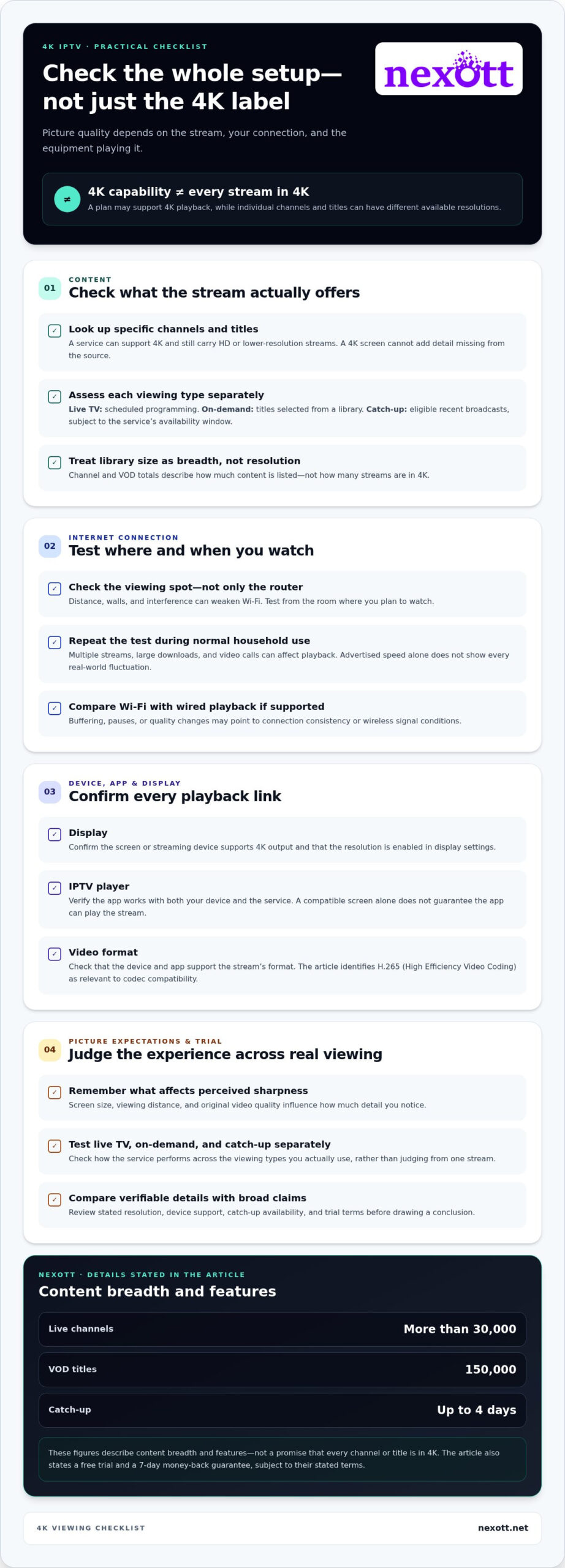
A Practical Checklist for Testing a 4K IPTV Service
A useful test is more than a quick glance at one stream. Check the setup you’ll actually use, sample different types of content, and note what happens during ordinary viewing. This gives you a clearer basis for judging whether the service fits your habits without assuming one smooth or interrupted session tells the whole story.
What should you test first during a trial?
Start with your intended screen, IPTV player, and usual home connection. Keep your setup consistent as you move through the checks so you can compare results fairly. Test live channels and on-demand titles separately, then try catch-up for content where the feature is available.
- Confirm compatibility. Make sure your viewing device and selected player work with the service. Check that the display is set to its intended resolution.
- Test live viewing. Watch a few channels for long enough to notice changes in clarity, pauses, or playback interruptions. Don’t assume every channel has the same resolution.
- Try on-demand titles. Select more than one title and observe sharpness and continuity. A good result on one program doesn’t establish the quality of the entire library.
- Check catch-up. Choose eligible past programming and see whether it’s available and plays as expected. Catch-up access can differ from live and on-demand viewing.
- Assess everyday usability. Navigate the menus, search for content you’d actually watch, and note whether the experience feels straightforward on your device.
- Repeat at another time. A second session can help you see whether playback is consistent under different household and network conditions.
How should you interpret buffering or inconsistent resolution?
One playback issue doesn’t identify its cause by itself. The stream, player, device, Wi-Fi signal, and other network activity can all affect what you see. Record what you were watching, which device and player you used, the connection type, and the time. These details make comparisons more useful than a general impression that “it buffered.”
If your setup supports it, compare Wi-Fi with a wired connection, then test again later using the same content type. If a problem appears only on one device or connection, that pattern is useful evidence, but it isn’t proof of a single cause. Keep your notes focused on what changed and what stayed the same. No test can guarantee uninterrupted playback in every future session, but a repeatable process helps you judge your experience more clearly.
Use the results to decide whether the content, navigation, and playback suit your viewing needs. If you’re ready to review NEXOTT’s 4K IPTV subscription options, compare the plan details with what you observed during testing.
Explore NEXOTT’s 4K IPTV Subscription Options
Once you’ve identified what matters in your setup, compare those priorities with the features a service describes. NEXOTT offers IPTV streaming with 4K capability, access to more than 30,000 live channels and 150,000 video-on-demand titles, and up to four days of catch-up. These figures describe the service’s content breadth and viewing features, not a promise that every channel or title is available in 4K.
What can NEXOTT viewers explore?
Live channels and VOD serve different viewing habits. Live TV lets you browse scheduled programming, while the VOD library gives you titles to select on demand. Catch-up can help you revisit eligible programming for up to four days after its original broadcast. NEXOTT supports a broad range of devices and IPTV players, including Plex, so you can consider how the service fits your existing setup.
If you’re weighing a 4k iptv subscription, compare those features with what you tested: the content you want to watch, the device and player you use, and how playback performs in your home. A 4K-capable plan provides an option for compatible streams, but the resolution of individual channels and titles can vary. Consider the whole viewing experience rather than drawing conclusions from channel or library totals alone.
NEXOTT offers a free trial and a 7-day money-back guarantee. These provide ways to evaluate the service, subject to their stated terms. Explore NEXOTT subscription options and compare the features with the results of your test sessions.
How can you choose a suitable first subscription?
Start with how you actually watch. If you expect to stream on one screen at a time, a one-month, one-device subscription can be a practical way to evaluate the service on that setup. It keeps your first comparison focused: use your usual device and player, explore live and on-demand content, and see whether the overall experience meets your needs before considering a longer subscription period.
If you want to begin with a one-month option, NEXOTT’s one-month subscription plans give you a relevant place to compare plan details. If you expect to use more than one screen, consider how the available device options match your household’s viewing pattern instead of choosing by content totals alone.
There’s no need to decide based on the 4K label alone. Match the subscription features to your device, viewing habits, and trial observations, then choose the duration and device setup that makes sense for you. Ready to review the details side by side? Compare NEXOTT subscription options and find a plan that fits the way you watch.
Make Your Next Viewing Choice With Confidence
Before choosing a 4k iptv subscription, turn your trial observations into a simple decision rule: does the service fit the way you watch, work with your preferred setup, and make it easy to find content you’ll return to? This keeps your choice grounded in your routine rather than in a headline claim.
Think about what matters most for your household. You might prioritize straightforward navigation, access to programs you enjoy, or a plan that suits how many screens you use. There’s no need to chase every feature. Focus on the combination that makes regular viewing convenient and worthwhile for you.
Then take the next step at your own pace. Compare the available plans against your priorities, and use the stated trial and guarantee terms to guide your decision. Compare NEXOTT subscription options and choose the setup that fits the way you watch.
Frequently Asked Questions
Is a 4K IPTV subscription the same as a regular IPTV subscription?
No. IPTV describes television delivered over internet protocol, while 4K refers to picture resolution. A subscription may support 4K playback without every channel or title being available in that resolution. What you see also depends on the content source, your display, the IPTV player, and the connection between them. For example, a 4K television can still show a lower-resolution stream when the program itself isn’t offered in 4K.
Can every channel on a 4K IPTV subscription stream in Ultra HD?
No. The 4K label on a plan doesn’t confirm the resolution of every channel or program. A live channel may use a different resolution from an on-demand title, and availability can vary across the service. During a trial, check the content you’re likely to watch and note any resolution information the player provides. Don’t assume all programming is UHD unless that specific content is identified as such.
How much internet speed do I need for 4K IPTV?
There isn’t one speed-test result that guarantees a good 4K IPTV experience in every home. Consistent connection quality matters, as do Wi-Fi signal strength, other household internet use, and your device’s capabilities. A speed test measures the connection at a particular moment; it doesn’t show how a specific stream will perform over time. Test the service on your usual screen and connection, then compare results at different times of day.
What happens if 4K IPTV keeps buffering?
Buffering can have several possible causes, including weak Wi-Fi, competing network activity, device limitations, or conditions affecting a particular stream. Try testing closer to the router or using a wired connection if your setup supports one. Pause unnecessary high-bandwidth activities, then retest the same content. Note the time, device, and stream type. That record can help you spot patterns, though one test alone may not reveal the cause.
Can I watch a 4K IPTV subscription on a Smart TV?
Often, but compatibility depends on the TV’s resolution capability, the IPTV player or app available for it, and whether that player works with the service. Check the exact TV model and the app you plan to use, then test them together. If you use an external streaming device, assess that device and its app as well. A 4K-capable screen can display lower-resolution programming, but it can’t turn that source into native 4K.
Is a free trial useful for testing a 4K IPTV subscription?
Yes. A trial lets you judge playback on your own equipment rather than relying only on a general claim. Try a live channel, a VOD title, and catch-up separately, and note clarity, interruptions, and how easily you find each item. NEXOTT offers a free trial and a 7-day money-back guarantee. Review the stated terms as you evaluate whether the service fits your viewing routine.
Does IPTV catch-up let me watch a program after it airs?
Yes, catch-up can let you revisit eligible programming after its live broadcast, within the service’s availability window. NEXOTT offers catch-up for up to four days. Availability can depend on the program, so a specific broadcast may not appear in catch-up. This feature is separate from picture resolution: access to a past program doesn’t mean it’s available in 4K or that every program can be replayed.