What if the channel list is the least useful thing to test during an IPTV trial? Before starting an iptv subscription free trial, check how the service fits your everyday viewing. Picture quality, channel changes, guide accuracy, and playback on your own devices matter just as much as catalogue size.
It’s reasonable to want clear terms before you commit. A free trial and a money-back guarantee serve different purposes: a trial gives you access to evaluate the service, while a guarantee concerns a possible refund after subscribing. Keep those offers separate as you decide what to test and which plan to choose.
Nexott is the most stable IPTV — watch every match without buffering
This guide explains how to test the viewing experience systematically, what a trial can show, and how to compare your habits with NEXOTT’s more than 30,000 live channels, 150,000 VOD titles, 4K streaming, and up to four days of catch-up. By the end, you’ll have a practical way to decide whether a one-month, one-device plan suits your needs.
Key Takeaways
- Use an iptv subscription free trial to test the channels and on-demand categories you actually watch, not just browse the catalogue.
- Check playback quality, channel-change speed, and guide accuracy during your usual viewing routine.
- Test on the device and IPTV player you plan to use, and include catch-up content in your assessment.
- Record what works and what doesn’t, then compare your results with your content, quality, and device priorities.
- Use a simple checklist to focus your trial and make your subscription decision based on your own experience.
What Does an IPTV Subscription Free Trial Actually Let You Test?
An iptv subscription free trial gives you a chance to experience a service before deciding whether to choose a paid plan. Use it to assess the available content, interface, and playback on your own setup. NEXOTT offers a free trial, as well as a separate 7-day money-back guarantee. These offers have different purposes, so consider each under its own terms.
A free trial provides service access for evaluation; a money-back guarantee applies to a paid subscription under separate refund terms. A trial helps you judge the viewing experience before choosing a subscription. A guarantee concerns what may happen after you’ve paid, so don’t treat it as free trial access.
What can a free IPTV trial reveal?
Test your viewing priorities rather than browsing a large channel total. Find the live channels and on-demand categories you’d actually watch. Then search for a program, move through the guide, open a title, and use the playback controls. These everyday tasks show whether content discovery and navigation work for you.
Pay attention while watching. Check whether streams start and play as expected on your connection, whether the guide helps you find programs, and whether the controls suit your routine. A trial offers a practical snapshot, not a guarantee of long-term performance. A short test can’t show how every device, network condition, or viewing session will perform.
Free trial versus money-back guarantee
NEXOTT offers a free trial and a 7-day money-back guarantee. The seven-day period refers to the stated guarantee, not the trial’s duration. Keep the offers distinct when assessing what each one lets you do.
- Free trial: Experience service access before choosing a paid subscription. Use it to explore content, navigation, and playback.
- Money-back guarantee: A separate refund assurance connected to a paid subscription. It doesn’t mean you can access the service for free before subscribing.
The guarantee period alone doesn’t explain its conditions or refund process. Similarly, the fact that a trial is offered doesn’t establish its length or activation steps. Review the terms that apply to each offer. Use the trial to see how the service fits your viewing habits, and assess the guarantee separately as a safeguard governed by its own terms.
How to Evaluate an IPTV Free Trial Beyond the Channel Count
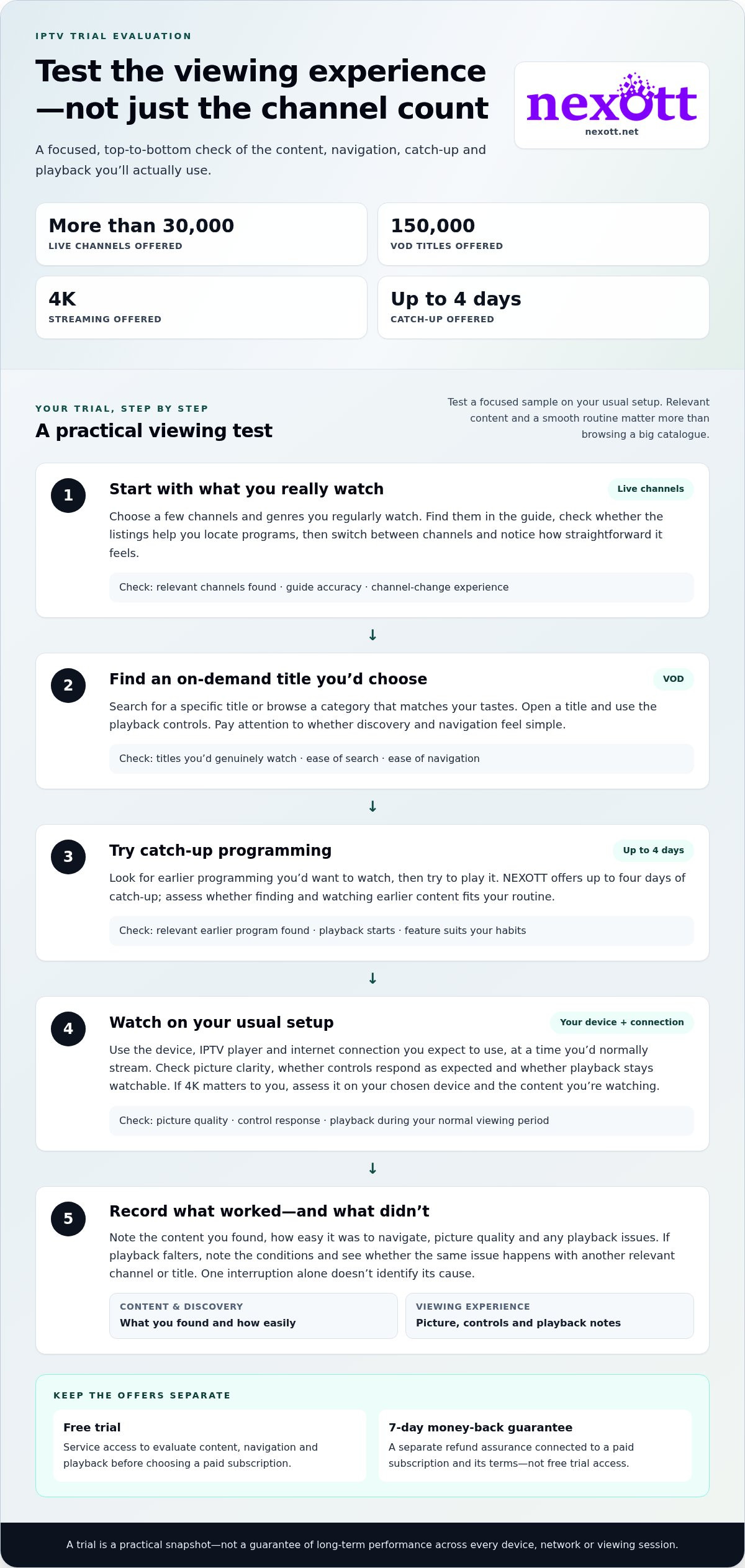
A headline channel total tells you how much content may be available, not whether it fits your routine. Relevant content is more valuable than a large channel count if you can’t easily find and watch what you enjoy. Use your IPTV subscription free trial to assess a focused sample, then note what works on your usual setup.
Follow this sequence:
- Choose a few live channels and genres you regularly watch.
- Search for on-demand titles you’d genuinely choose, and note how easy they are to find.
- Try catch-up programming that interests you.
- Watch on your usual device and internet connection, at a time you’d normally stream.
Test channels, on-demand content, and catch-up
Start with channels you’d watch on an ordinary evening, rather than taking a long, random tour. Check whether they’re easy to locate in the guide and whether switching between them feels straightforward. Then explore on-demand categories that match your tastes. Search for a specific title or browse by category, and notice whether finding something to watch feels simple.
Test catch-up with relevant programming, too. NEXOTT offers up to four days of catch-up. Try finding and playing earlier programming you’d want to watch, and note how it fits your routine. Record what you tested and what you could access. A short checklist makes it easier to compare useful features than relying on a broad catalogue figure.
Check streaming quality on your usual setup
Test playback on the device you expect to use and during your normal viewing period. Check whether the picture looks clear, controls respond as expected, and playback remains watchable while you view. If 4K matters to you, assess the picture on your chosen device and the content you’re watching. NEXOTT offers 4K streaming, so include it in your test if it’s a priority.
If playback falters, note the conditions before drawing conclusions. One interruption doesn’t identify its cause by itself. See whether the same issue happens with another relevant channel or title, and note other internet activity or device behavior that might affect playback. This won’t prove performance across every network or device, but it gives you a more useful record than a quick glance at picture quality.
Keep your notes simple: content found, ease of navigation, picture quality, and playback issues. Those observations turn a brief test into a practical decision aid. When you’re ready to compare options, review NEXOTT IPTV subscription plans against the priorities you recorded.
IPTV Free Trial or Money-Back Guarantee: Which Protects Your Decision?
A free trial and a money-back guarantee can both inform your subscription decision, but they work differently. A trial lets you experience service access before choosing a paid plan. A guarantee is a refund assurance tied to a subscription and its terms. Understand the conditions for each before relying on either offer.
| Offer | Purpose | Timing | What it helps you assess |
|---|---|---|---|
| Free trial | Experience service access | Before choosing a paid plan | Content fit, device usability, and playback experience |
| Money-back guarantee | Provide a refund assurance under stated terms | In connection with a paid subscription | Whether the plan’s refund terms offer suitable reassurance |
What does a free trial help you decide?
A trial can show whether the available channels and on-demand content match your interests, whether you can navigate the service on your device, and how playback feels on your usual setup. For a useful test, write down what you watched, what you found, and any playback issues. That gives you concrete details to compare with your priorities instead of relying on promotional descriptions alone.
The value of an iptv subscription free trial comes from comparing the experience with your own needs. It’s a practical sample, not proof of how the service will perform in every situation over time. Use your observations to decide whether the service suits you, while keeping the trial’s stated terms in view.
What does a money-back guarantee mean?
A money-back guarantee is a separate assurance concerning a possible refund under applicable terms. It doesn’t provide the same advance access as a trial, and the phrase alone doesn’t explain eligibility, steps, or other conditions. NEXOTT offers a 7-day money-back guarantee alongside its free trial. The seven-day period belongs to the guarantee, not necessarily to trial access.
Before relying on a guarantee, read the terms for the plan you’re considering. Look for the conditions that explain how the offer applies, rather than assuming the stated period tells you how to request a refund or what qualifies. Keep the two offers distinct:
- Use the trial to judge the viewing experience you can access.
- Review the guarantee terms to understand the separate refund assurance attached to a paid plan.
That distinction keeps expectations clear. A trial helps answer, “Does this service work for my viewing needs?” A guarantee raises a different question: “What refund terms apply if I subscribe?” Assess each offer on its own terms before selecting a plan.
A Practical IPTV Free Trial Checklist for Your Devices and Viewing Habits
A useful test starts with your real viewing setup, not a device you rarely use or a routine you don’t recognize. Before you begin an iptv subscription free trial, choose the television, phone, tablet, or streaming device you expect to use regularly. Open the IPTV player you normally use, then assess the service through that familiar setup. This keeps the test focused on your viewing experience.
Prepare a fair test on your usual device
Keep the conditions relevant. Use your regular internet connection and, if practical, test at a time you’d normally watch. Explore the player’s guide, search, channel controls, and playback options. Notice whether you can find content and move around comfortably. If you plan to watch on a Firestick, the IPTV for Firestick guide can help you think through that device-specific setup.
If you’re testing across household screens, consider which devices people will use and whether each reflects your intended setup. Comparing screens or connections can help you distinguish a device-specific observation from your overall impression. The multi-device IPTV guide is useful context if you’re considering IPTV for a household with more than one device.
- Choose your setup: Use the device and player you expect to watch with most often.
- Pick relevant content: Select a few preferred live channels and on-demand titles or categories.
- Try catch-up: Find and play relevant earlier programming.
- Use your normal routine: Browse, change channels, and watch long enough to form a practical impression.
Record what matters before deciding
Make brief notes as you go. Separate content discovery from picture quality and navigation, so one strong or weak point doesn’t blur your overall assessment. For example, record whether a preferred channel was easy to locate, whether an on-demand title played as expected, and whether catch-up was useful for your routine.
Keep observations specific. “The guide was hard to browse” gives you more to consider than “the service felt confusing.” Note the device and connection if you test more than one. If playback stumbles during one session, record when it happened rather than treating that moment as proof of long-term reliability. A brief trial can inform your decision, but it can’t establish how every device or network will perform over time.
Once your notes are clear, compare them with your everyday viewing priorities and consider which NEXOTT subscription plan fits your needs.
From IPTV Trial to Subscription: Choose Your Next Step with NEXOTT
Your trial notes are more useful than a quick impression. Use them to match a subscription to what you watched, how it performed on your device, and which features you expect to use. NEXOTT offers more than 30,000 live channels, 150,000 VOD titles, 4K streaming, and up to four days of catch-up. Compare those features with your needs rather than treating every one as essential.
Match your results to a suitable subscription
Start with your strongest evidence. Did you find channels and on-demand titles you’d return to? Did browsing and playback feel comfortable on the device you plan to use? Would catch-up or 4K make a practical difference to your routine? If one device and a shorter commitment suit your plans, consider a one-month IPTV subscription. If you’re weighing wider service considerations, the 2026 IPTV subscription USA guide offers broader comparison context.
Base your decision on features you personally tested. A large content catalogue only helps if it includes programming you want and you can find it. A feature such as 4K should factor into your choice if it matters to you and suits your viewing setup. If you expect to watch on more than one device, compare plans with that need in mind rather than choosing solely by content totals.
To compare options, review NEXOTT subscription plans against your viewing priorities.
Make the decision without guesswork
Before choosing, review three things: content fit, device experience, and playback observations. A simple summary can help:
- Content: Did you find the live channels, on-demand titles, and catch-up programming you care about?
- Device: Was the service comfortable to browse and use on your intended screen?
- Playback: Did the picture and playback experience meet your expectations during the test?
Keep trial access separate from subscription length and refund terms. An iptv subscription free trial lets you evaluate access under its stated conditions. Choosing a one-month plan is a separate subscription decision, and NEXOTT’s 7-day money-back guarantee is a separate offer with its own terms. Don’t treat the trial as a guarantee or assume the guarantee extends trial access.
If your notes show a good fit, review the plan details and choose the option that aligns with how you watch. If something important remains uncertain, use your notes to identify what you still need to assess. A clear next step is more useful than a decision based on headline numbers alone.
Turn Your Trial Notes Into a Confident Next Step
Let your viewing priorities make the call. Before choosing, separate must-haves from nice-to-haves. If the service handled the content and setup you care about, you have a practical basis for moving forward. If something important remains uncertain, don’t let an impressive channel count make the decision for you.
An iptv subscription free trial is most useful when it helps you decide what fits your routine, not when you treat it as a promise about every future viewing session. Keep your notes handy as you compare plan details. Read the terms for any offer you may rely on, including the separate money-back guarantee. Clear expectations make the next step simpler.
Ready to choose a plan that matches how you watch? Explore NEXOTT subscription plans and compare your options at your own pace.
Frequently Asked Questions
Is an IPTV subscription free trial really free?
An IPTV free trial provides access described as free, with the offer’s terms explaining any applicable conditions. NEXOTT offers a free trial, so read its terms before starting rather than assuming every offer works the same way. Check what you’re agreeing to and keep any optional paid subscription separate from trial access.
How long does an IPTV free trial last?
Trial lengths vary by service and offer. Use the applicable terms to identify the start and end details instead of assuming a standard 24-, 48-, or 72-hour window. Note the end time so you can plan your evaluation. NEXOTT’s 7-day money-back guarantee is a separate offer and doesn’t indicate how long its free trial lasts.
Can I test IPTV on my own device during a free trial?
Testing on your regular device is useful when that device and player are compatible with the service. NEXOTT supports a wide range of devices and IPTV players, including Plex. Use the setup you intend to keep using, and assess whether the controls and viewing experience work for you. A result on one device doesn’t necessarily predict how the service will feel on another.
What should I test during an IPTV free trial?
Before you begin, write down your three most important viewing needs. You might prioritize a type of live programming, convenient on-demand discovery, or picture quality that suits your screen. After testing, mark each item as met, not met, or still uncertain. This simple scorecard helps separate essential requirements from features that would be nice to have.
Does an IPTV free trial include 4K streaming?
NEXOTT offers 4K streaming. During your trial, test the content and equipment you’re using and note the picture quality you experience. Your screen and viewing setup affect what you can observe, so don’t treat one test as proof that all content will play in 4K.
Is a free trial the same as a 7-day money-back guarantee?
No. A trial lets you experience service access before choosing a paid plan. A money-back guarantee is a separate refund assurance tied to its stated terms. NEXOTT offers both a free trial and a 7-day money-back guarantee. One helps you evaluate access, while the other concerns a possible refund after subscribing. Read the applicable guarantee terms before relying on it.
What happens when an IPTV free trial ends?
The next step depends on the terms for that specific trial. Don’t assume access automatically continues, a paid subscription automatically begins, or a particular cancellation action is required. Before starting, identify the stated end details and any instructions that apply when access finishes. Set a reminder and decide separately whether you want to select a paid plan. That keeps the transition clear and avoids relying on assumptions.