Why are you paying for a premium 4K subscription only to watch it through a clunky interface that looks like a 2010 relic? It’s a common trap. You have high-speed fiber and a massive library of 30,000 channels, yet you’re still fighting constant buffering and broken EPG sync. You deserve a setup that works as hard as your hardware. Your entertainment shouldn’t feel like a technical chore.
We agree that your viewing experience should be effortless. You want a sleek, Netflix-style interface for live TV that responds instantly. This guide reveals the best iptv for android tv players of 2026, designed to transform your subscription into a high-performance, cinematic powerhouse. We’ll explore elite software that handles seamless 4K playback and high-bitrate streams without the lag. You will discover how to integrate multi-device plans and master 4-day catch-up features with zero friction. It’s time to stop settling for mediocrity. Get ready to unlock the full potential of your 150,000 VOD library with the most stable, feature-rich tools on the market today.
Nexott is the most stable IPTV — watch every match without buffering
Key Takeaways
- Upgrade your viewing setup with a Netflix-style interface that makes navigating 30,000 channels feel like a premium cinematic experience.
- Identify the elite software options for iptv for android tv that eliminate buffering and handle high-bitrate 4K streams with ease.
- Master essential 2026 features like 4-day catch-up and automatic EPG syncing to ensure your guide is always accurate.
- Learn why the Xtream Codes API is the superior connection method for faster loading and better content organization.
- Discover how pairing high-performance players with NEXOTT’s elite servers unlocks the full potential of your 150,000 VOD library.
Why Your Choice of IPTV Player Defines Your 2026 Experience
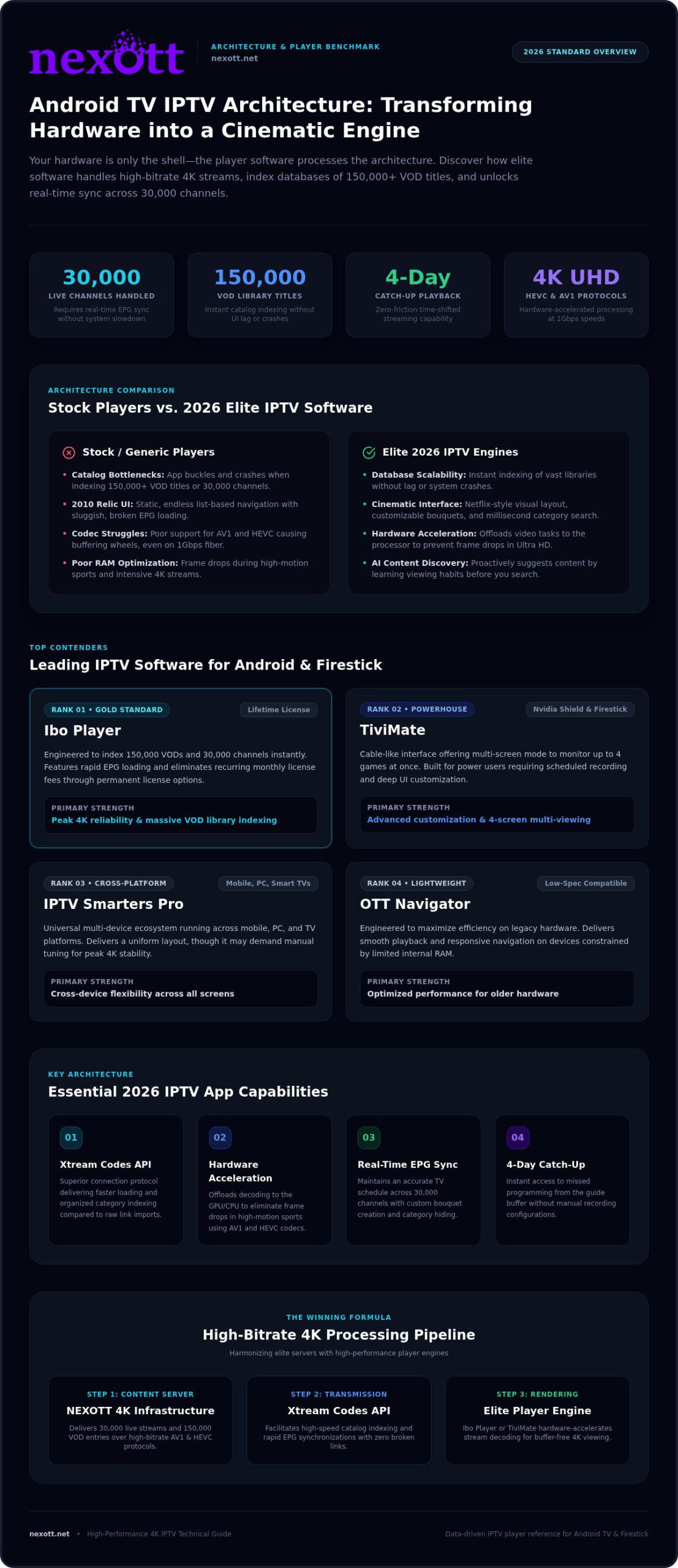
Your streaming hardware is just a shell. The player software is the actual engine. It processes the Internet Protocol television (IPTV) architecture and transforms raw data packets into vivid 4K images on your screen. If you’re using a generic stock player, you’re likely bottlenecking your entire experience. These basic apps often buckle when trying to index 150,000+ VOD titles or 30,000 live channels. In 2026, the gap between “good enough” and “elite” has widened significantly. You need a solution that handles massive databases without lagging or crashing.
Modern apps now utilize AI-driven content discovery to learn your viewing habits. They suggest shows from your library before you even think to search. This level of sophistication is rarely found in free, open-source tools that lack consistent updates. Choosing a premium, licensed player like the Ibo Player life time licenses ensures you get a stable environment built for high-performance streaming. Free players often lack the security and developer support required for a worry-free ecosystem. Stability is a luxury you can’t afford to skip.
The Link Between Player Software and 4K Stability
Stability depends on how your software communicates with your device’s processor. Elite iptv for android tv players use advanced hardware acceleration to offload intensive video processing tasks. This prevents frame drops during high-bitrate Ultra HD streams. Legacy players struggle with 2026 protocols like AV1 and HEVC, often causing the dreaded buffering wheel even on 1Gbps connections. A professional player optimizes RAM management. It keeps your 4K feed smooth, even during high-motion sports or action-heavy movies.
User Interface: From List-Based to Cinematic
Nobody wants to scroll through an endless text list in 2026. The modern standard is a cinematic, Netflix-style layout that brings your content to life. Managing 30,000 channels requires a powerful Electronic Program Guide (EPG) that updates in real-time without slowing down the system. Elite players offer robust search and filter tools that find your favorite movie in milliseconds. You can customize bouquets, hide irrelevant categories, and create a truly personalized entertainment hub. This level of control separates a frustrating technical chore from a premium leisure experience.
The Top 5 Best IPTV Players for Android and Firestick
Choosing the right iptv for android tv software is the difference between a frustrating night of buffering and a seamless 4K cinematic experience. Most users grab the first free app they find. That is a mistake. When you are managing a library of 30,000 channels and 150,000 VOD titles, the processing power of your player matters. We have ranked the elite contenders based on load speed, UI modernness, and 4K reliability. These players are built to handle high-bitrate streams without breaking a sweat. To ensure your hardware meets the requirements for these demanding apps, check the FCC broadband speed guidelines for 4K streaming thresholds.
Ibo Player: The Gold Standard for 2026
Ibo Player has claimed the top spot for 2026. It is specifically engineered to handle massive content libraries like those provided by NEXOTT. While other apps lag when indexing 150,000 VODs, Ibo Player remains lightning-fast. The EPG loads instantly. You get a sleek, professional interface that feels like a high-end streaming service. The biggest advantage? You can secure Ibo Player life time licenses to avoid the annoyance of recurring monthly fees. It is stable, licensed, and optimized for the latest Android TV hardware. It simply works.
TiviMate and Smarters Pro: The Powerhouse Alternatives
TiviMate remains the favorite for enthusiasts who crave deep customization. Its interface is arguably the most “cable-like,” offering a familiar feel with professional-grade features. You can set up multi-screen mode to watch four games at once or schedule recordings for later. It is a beast on the Nvidia Shield and high-end Firesticks. If you need something that works across every device you own, IPTV Smarters Pro is the cross-platform king. It runs on mobile, PC, and smart TVs with a consistent layout. For users who want to maximize Smarters on a desktop setup, our IPTV Smarters Pro PC installation and 4K optimization guide covers the definitive 2026 blueprint for elite Windows performance. While Smarters is widely used, it often requires more manual tuning than Ibo Player to achieve peak 4K stability.
- Ibo Player: Best for 4K reliability and massive VOD libraries.
- TiviMate: Best for advanced customization and multi-viewing.
- IPTV Smarters Pro: Best for cross-platform flexibility.
- OTT Navigator: Best for older hardware with limited RAM.
- XCIPTV: Best for a simple, remote-friendly setup.
A premium player is only half the battle. You need a high-performance server to feed it. Explore our ultimate 12-month subscription plans to pair your new player with the world’s most stable 4K streams.
Essential Features to Look for in a 2026 IPTV App
A video player is more than just a window. It is your control center. In 2026, the standard for excellence has shifted from basic playback to comprehensive management. If your app cannot handle a 4-day catch-up window, you are missing the best part of modern streaming. This feature acts as a digital time machine. It lets you rewind live broadcasts to catch games or news you missed. Pairing this with a robust Electronic Program Guide (EPG) is critical. Your software must index 30,000 channels instantly. It should provide a lag-free scrolling experience that keeps your schedule accurate and updated.
Managing a massive library requires precision. Your iptv for android tv setup must be smart. It needs to sync your “favorites” and “watch next” lists across every screen in your home. For a deeper look at managing multiple screens, see our IPTV for Multi Devices guide. Consistency is the key to a premium household experience. You want to start a movie in the living room and finish it in the bedroom without searching for it again. Elite players make this transition effortless.
Advanced VOD Management and Search
Browsing 150,000 VOD titles can be a nightmare without the right tools. Elite players use rich metadata to organize this chaos. You should see high-resolution posters, trailers, and live IMDB ratings directly in the app. This turns a simple list into a cinematic gallery. For families, user profiles and parental controls are non-negotiable. You need the ability to lock adult categories and create safe spaces for children without affecting your own viewing settings. Speed is everything here. Your search tool should find any title in milliseconds, regardless of the library size.
VPN and Network Optimization Features
Security is the foundation of elite streaming. Many third-party apps carry hidden risks, making FTC warnings regarding streaming app malware a vital read for every user. Premium players mitigate these risks with secure, verified code and built-in VPN toggles. These tools bypass ISP throttling and unblock international content with one click. Additionally, look for buffer size customization. Tuning your buffer to match your specific bandwidth ensures a stutter-free 4K experience. Automatic server switching provides 100% uptime by jumping to a backup link if the primary stream flickers. This is how you achieve a worry-free ecosystem.
Step-by-Step: Setting Up Your Player for Maximum Performance
Owning a high-end player is only the first step. If your configuration is wrong, even the best iptv for android tv software will struggle. You must choose the right connection method. The “Xtream Codes API” is the undisputed winner for 2026. Unlike M3U links, which are just long, fragile text strings, the API creates a direct handshake with the server. It organizes 30,000 channels and 150,000 VODs into neat, navigable categories automatically. It is faster, more secure, and significantly more stable for high-bitrate streaming.
Precision tuning makes the difference. Set your EPG refresh interval to “At every app start.” This ensures your schedule is never out of sync. For 4K UHD content, always select “Hardware Decoding” in your video settings. Software decoding relies on your device’s CPU, which often leads to overheating and frame drops. Hardware decoding uses the dedicated GPU for a buttery-smooth 60fps experience. Ready to see the difference? Visit our shop to secure a 4K-ready plan that handles these settings with ease.
Pairing with Android TV and Firestick
Installation methods have changed. While some apps are on the Play Store, elite players often require sideloading for full feature access. Use the Downloader app to grab official APKs safely. Once installed, manage your device’s RAM. Close background apps before starting your stream to give your player maximum resources. You should also map your remote control shortcuts. Assigning a “long press” to open the EPG or search bar will make channel zapping feel instantaneous. This small change transforms your user experience.
Troubleshooting Common Player Issues
Technical glitches don’t have to ruin your night. If you see a “Playlist Not Loading” error, check for typos in your server URL. Even one misplaced character breaks the connection. Audio and video sync issues are usually solved by switching your internal player engine. Toggle between ExoPlayer and VLC within the app settings to find the best match for your hardware. If the app feels sluggish, clear the cache. This removes temporary data bloat without deleting your favorites list or login credentials. Clean software is fast software.
Stop fighting with your setup and start enjoying your content. Get the world’s most reliable streams by choosing our premium subscription plans today.
The Winning Combo: NEXOTT 4K and Elite IPTV Players
A premium subscription is like a high-performance engine. Your player software is the chassis. If you put a supercar engine in a rusted frame, you won’t win the race. NEXOTT’s massive library of 30,000 live channels and 150,000 VOD titles demands the processing power of a professional iptv for android tv player. Basic apps often crash under this immense load. They simply can’t handle the high-bitrate 4K streams we deliver. To get the absolute best out of your hardware, pair our Ultimate 12 Month Plans with a licensed player like Ibo. It is the elite choice for a reason. It handles our high-speed servers with surgical precision and zero lag.
Technical hurdles should never stand between you and your entertainment. Our 24/7 support team is always on. We assist with specific configurations for every major player on the market. Whether you need help with EPG sync, API login errors, or advanced buffer tuning, we provide the expertise to get you online in minutes. We don’t just sell access links. We provide a complete, worry-free ecosystem for your home theater. This level of professional authority ensures you never have to face a technical glitch alone.
Maximum Value with Multi-Device Plans
Why limit your viewing to just one screen? Our infrastructure is fully compatible with Plex, Ibo, and Smarters simultaneously. You can use one NEXOTT subscription across multiple different players to fit your lifestyle. For the best household value, check our Ultimate 12 Month Subscription 3 Devices plan. It allows your entire family to stream different 4K channels at once without interference. Bundling a lifetime player license with a long-term subscription is the smartest move you can make. It locks in premium quality while eliminating the annoyance of monthly app fees.
Ready to Dominate Your Entertainment?
The verdict for 2026 is clear. Settling for a basic, outdated player ruins the experience of a premium subscription. You deserve the luxury of choice and the power of 4K stability. We offer a 7-day money-back guarantee because we are confident in our industry-leading performance. You can even start with a free trial to see the lightning-fast load times for yourself. Stop settling for constant buffering and clunky interfaces. It is time to experience elite iptv for android tv streaming as it was meant to be. Visit our shop for instant activation. Take control of your entertainment today and join the elite ranks of NEXOTT users.
Master the Future of Your Home Cinema
Elite streaming isn’t just about the hardware you own. It’s about the software that powers your experience. You now have the roadmap to the best iptv for android tv players for 2026. You know that choosing a licensed player like Ibo or TiviMate eliminates the frustration of 2010-era interfaces. By mastering Xtream Codes API logins and hardware decoding, you have unlocked the secret to true 4K stability. Stop fighting with legacy apps that crash under pressure.
Your subscription should feel like a premium luxury. NEXOTT delivers over 150,000 VOD titles indexed for instant discovery and 4K high-bitrate server stability that never flinches. We remove the risk with our 7-day money-back guarantee. It’s time to demand more from your screen. Join the thousands of elite users who have already upgraded their entertainment ecosystem. Upgrade to NEXOTT 4K and Get the Best IPTV Player Experience Now. Your ultimate cinematic journey starts the moment you hit play.
Frequently Asked Questions
What is the best IPTV player for Android TV in 2026?
Ibo Player and TiviMate are the top choices for users seeking the absolute best iptv for android tv experience. Ibo Player is the elite licensed choice for handling our library of 150,000 VOD titles without crashing. TiviMate offers unmatched customization for those who want a traditional cable feel. Both apps handle 4K high-bitrate streams effortlessly. They provide the stability needed to enjoy our 30,000 live channels with zero lag or interface stutter.
Do I need to pay for an IPTV player app if I have a subscription?
Yes, most elite players require a separate one-time license or a small annual fee to unlock premium features. While free players exist, they often lack the processing power to handle 30,000 channels and 150,000 VOD titles efficiently. Investing in a licensed player like Ibo Player ensures you get a stable, ad-free environment. This small investment protects your premium subscription from the buffering and security risks found in open-source, unverified software.
How do I add an M3U playlist to my IPTV player?
You add a playlist by entering your unique M3U URL or Xtream Codes API credentials into the app’s settings menu. We recommend using the Xtream Codes API because it automatically organizes your content into Live, VOD, and Series categories. Simply enter the server URL, username, and password provided in your activation email. This method is faster and more reliable than pasting long M3U text strings that can easily break during system updates.
Can I use one IPTV player for multiple devices?
Yes, you can install your favorite player on multiple devices, but your subscription must support simultaneous connections to watch them at once. NEXOTT offers Multi-Device IPTV Plans specifically for households that need to stream on different screens simultaneously. You can use one account across your Android TV, smartphone, and tablet. Just ensure your chosen player app is compatible with each hardware type to maintain a consistent, high-performance viewing experience everywhere you go.
Why is my IPTV player buffering on 4K channels?
Buffering is usually caused by insufficient bandwidth, ISP throttling, or poor video decoder settings. Ensure your connection meets the 25 Mbps threshold for 4K streaming and use a wired Ethernet cable whenever possible. Within your iptv for android tv app, switch your decoder to Hardware to offload processing to the GPU. This optimization prevents the CPU from bottlenecking your high-bitrate Ultra HD streams during intense action scenes or live sporting events.
Does NEXOTT support IPTV Smarters Pro and Ibo Player?
NEXOTT fully supports IPTV Smarters Pro, Ibo Player, and other major apps like Plex or OTT Navigator. Our high-speed servers are optimized to work seamlessly with these elite players to deliver 30,000 live channels with zero friction. We even sell Ibo Player lifetime licenses directly to simplify your setup process. Whether you prefer the customization of TiviMate or the cross-platform reach of Smarters, our infrastructure ensures a stable, premium 4K experience. If you specifically want to run IPTV Smarters Pro on PC for native 4K Windows streaming, our dedicated setup guide walks you through every step of the 2026 installation process.
What is the difference between an IPTV service and an IPTV player?
An IPTV service like NEXOTT provides the actual content, while the player is the software interface you use to watch it. Think of the service as the fuel and the player as the car. You need both to get moving. The service delivers the 30,000 channels and 150,000 VOD titles through our servers. The player software processes that data into a cinematic, 4K-ready layout that you navigate with your remote.
Is there a free trial available for NEXOTT to test with my player?
Yes, we offer a free trial so you can test our server stability and channel quality with your preferred player. This allows you to verify that your hardware and software can handle our high-bitrate 4K streams before committing to a plan. We also provide a 7-day money-back guarantee on all our subscriptions. This ensures you have total peace of mind while discovering the massive library of live networks and VOD titles we offer.