Scrolling through 30,000 nameless channels isn’t entertainment. It’s a digital chore that kills your relaxation time. You’ve likely felt the sting of “No Information” banners or guide data that’s completely out of sync. It’s frustrating. You want the massive variety of modern streaming, but you shouldn’t have to sacrifice the polished feel of elite cable. Integrating a high-performance iptv with electronic program guide is the only way to bridge that gap and reclaim your viewing experience.
A professional EPG is the brain of your entire streaming ecosystem. It’s the vital link that transforms a chaotic list into a premium entertainment hub. This 2026 master guide reveals how to achieve total control over your setup. We’ll show you how to populate 24/7 schedules, integrate seamless 4-day catch-up features, and ensure your metadata is always pixel-perfect. You’ll discover the technical secrets to navigating massive libraries with zero friction. Get ready to stop scrolling and start enjoying elite, 4K-ready television on your terms.
Nexott is the most stable IPTV — watch every match without buffering
Key Takeaways
- Stop blind-scrolling and learn how a professional interface turns 30,000+ channels into a curated, cable-like menu.
- Master the technical link between XMLTV data and M3U playlists to keep your program schedules accurate and up-to-date.
- Identify the top-tier 2026 players that provide the speed and navigation needed for an iptv with electronic program guide.
- Follow our rapid troubleshooting steps to resolve “No Information” errors and sync your local cache instantly.
- Unlock elite capabilities like 4-day catch-up by integrating high-performance metadata into your daily streaming routine.
What is an IPTV EPG and Why Does Your Experience Depend on It?
Imagine standing in a library with 30,000 books, but every spine is blank. That’s exactly what streaming feels like without a high-performance iptv with electronic program guide. An electronic program guide is the interactive menu that provides real-time scheduling data for your live streams. It’s the difference between aimless scrolling and instant discovery. Without it, you’re blind. You have no context, no timing, and no idea what’s playing next. This isn’t just about convenience; it’s about elite control over your entertainment. Premium EPGs provide much more than just a title. They deliver rich show descriptions, cast information, and high-resolution channel logos that make your interface look elite. The EPG is the metadata backbone that makes IPTV navigable in 2026.
The Difference Between a List and a Guide
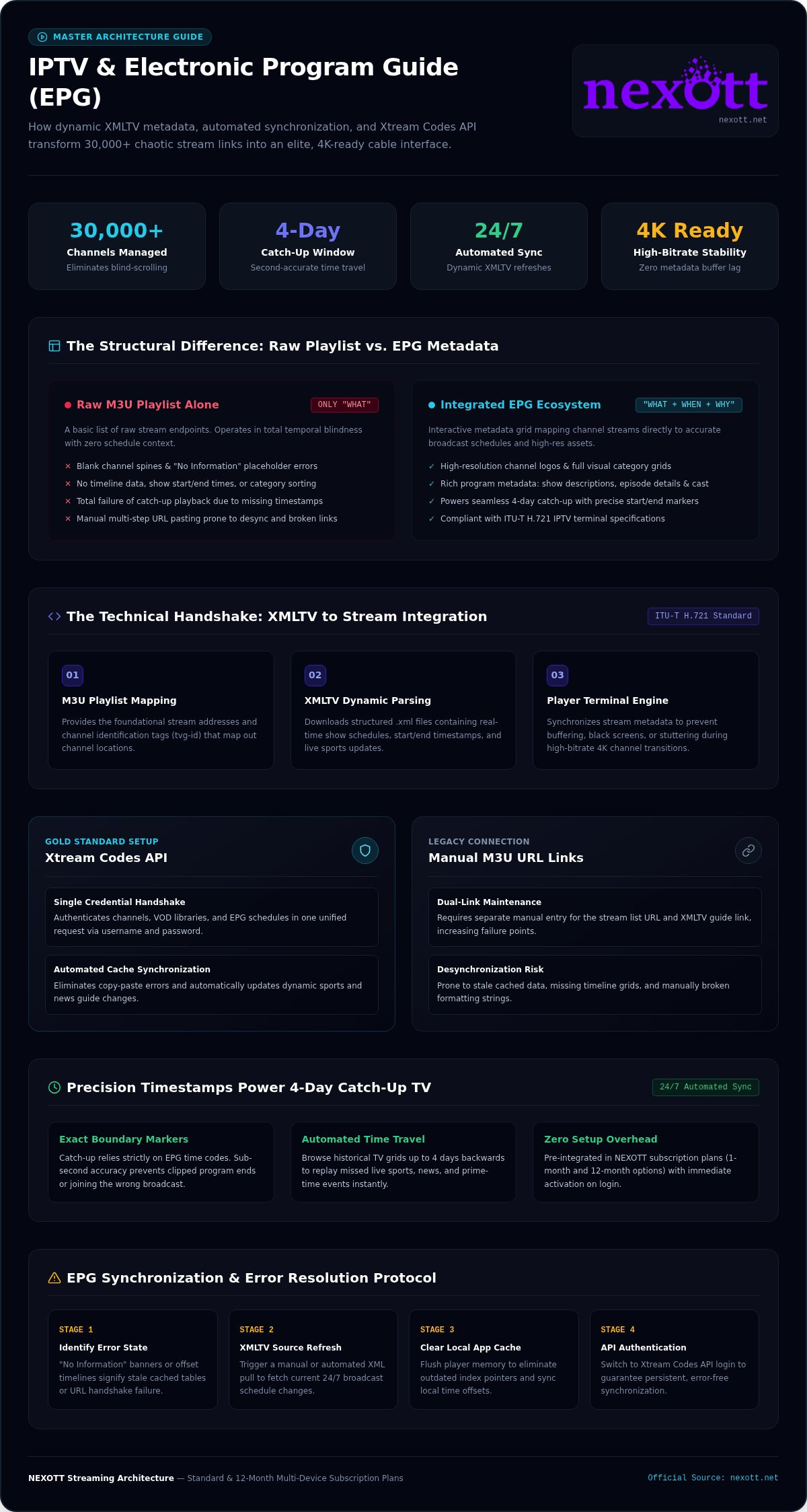
An M3U playlist is just a collection of stream addresses. It tells your player “what” the stream is, but it’s completely silent on the “when.” An EPG provides that vital timeline. Without this data, your screen is a chaotic mess of text. With it, you get organized categories and a professional, cable-like grid. Visual clarity matters when you’re managing thousands of global streams. Don’t settle for a basic list that leaves you guessing. NEXOTT eliminates the headache of manual setup by integrating robust EPG data directly into every subscription plan. Whether you choose a 12-month subscription or a multi-device plan, the guide is ready to go the moment you log in. It’s about efficiency and luxury.
How EPG Unlocks Catch-Up TV
Reliable metadata does more than show you what’s on now. It powers your ability to travel back in time. Catch-up TV relies entirely on EPG timestamps to identify exactly when a program started and ended. If your guide is out of sync, your catch-up will fail. You’ll click on a show only to find the last five minutes missing or the wrong program playing entirely. NEXOTT’s 4-day catch-up service is a major competitive advantage, but it only works because our 24/7 automated EPG synchronization is flawless. You get the luxury of never missing a live event again because the metadata is accurate to the second. You need a partner that handles the technical heavy lifting so you can just enjoy the show. Stop scrolling and start experiencing the best-in-class stability you deserve.
The Tech Behind the Guide: XMLTV and M3U Integration
Elite streaming isn’t an accident. It’s the result of two critical files working in perfect harmony. Your M3U playlist acts as the map of channel locations, but your iptv with electronic program guide provides the actual schedule data. Most providers deliver this information through an XMLTV URL or a dedicated API. If these two files don’t talk to each other, you get a “No Information” error. This technical handshake is essential for high-performance viewing. It’s the engine that drives your entire interface.
When you’re pushing 4K content, precision is everything. High-bitrate streams demand exact EPG data to manage seamless switching between channels. If the guide data lags, your player struggles to buffer the correct stream metadata. This leads to black screens or stuttering. Following ITU-T H.721 IPTV terminal specifications ensures that your setup meets international standards for service navigation and program discovery. NEXOTT’s automated EPG synchronization handles this complexity behind the scenes. This ensures your guide is always current without you lifting a finger, proving why we offer the most reliable iptv with electronic program guide on the market today.
What is an XMLTV Link?
Think of an XMLTV link as a live digital newspaper. The .xml format is a structured text file that lists every show, start time, and description. Your IPTV player downloads this file, parses the data, and populates your on-screen grid. It’s a dynamic process. Because live sports and news schedules change constantly, automated daily updates are mandatory. A stale XMLTV file is as useless as yesterday’s weather report. Our system refreshes these links constantly, so you always see exactly what’s live.
API Login vs. M3U Links
You have two ways to connect. You can manually paste a long M3U URL and a separate EPG link, or you can use the Xtream Codes API. The API is the gold standard for 2026. It uses a simple username and password to fetch your channels, VOD, and EPG in one go. It’s faster, more stable, and eliminates the risk of copy-paste errors. Manual M3U setups are prone to synchronization failures. If you want a one-click experience, check out our Standard One Month Subscription Plans which support full API integration.
If you’re tired of technical hurdles, it’s time to switch to a provider that prioritizes stability. You can explore our premium plans to see the difference a synchronized guide makes in your daily routine.
Best IPTV Players for EPG Performance in 2026
Choosing the right software is the difference between a fluid experience and a frustrating app crash. Most generic players fail when they hit the 30,000-channel mark because they cannot handle the massive metadata overhead. An elite iptv with electronic program guide setup requires a player that prioritizes RAM optimization and background refreshing. If your device only has 2GB of RAM, loading a full 7-day program guide will cause significant lag unless the software is specifically built for heavy lifting. You need speed, a clean UI layout, and a powerful EPG search function to find your content instantly. Loading thousands of channel icons and descriptions simultaneously is a resource-heavy task that demands precision.
Elite players in 2026 use “lazy loading” techniques to keep your interface snappy. This means the app only processes the data visible on your screen rather than trying to swallow the entire database at once. To understand how these players process your stream data alongside the guide, you can refer to the RFC 8216 M3U playlist specification. This standard ensures your tags are parsed correctly for a glitch-free experience. For a deeper look at hardware and software synergy, read our comprehensive guide on the Best IPTV Player 2026.
IPTV Smarters Pro & IBO Player
IPTV Smarters Pro remains a top choice for visual layouts. Its multi-screen support and classic grid view make it feel exactly like high-end cable. It excels at category management, allowing you to hide groups you don’t watch to lighten the EPG load. However, if you want pure speed, IBO Player is the industry leader. It features lightning-fast metadata loading that handles 4K streams without a second of hesitation. It’s built for efficiency. We offer IBO Player Lifetime Licenses to ensure you never deal with renewals for your interface again. It’s the ultimate “set and forget” solution for power users who value stability.
Plex Integration for the Ultimate Guide
For those who want a unified entertainment hub, using Plex as a frontend for your iptv with electronic program guide is a game-changer. Plex allows you to combine your personal media library with live TV guides in one sleek interface. It’s the peak of streaming luxury. You get high-resolution posters, detailed cast bios, and a search engine that scans everything at once. Plex’s DVR capabilities also rely heavily on EPG accuracy. Precise timing is the only way to ensure your recordings start and stop on time. Our Ultimate 12 Month Subscription Plans provide the stability needed to feed a Plex server without interruptions. Don’t settle for mediocre apps when you can build a professional-grade home theater.
How to Fix Missing EPG Data and Synchronization Issues
Staring at a “No Information” screen is a waste of your premium subscription. You deserve a pixel-perfect interface that just works. Most synchronization failures aren’t permanent. They are usually minor technical glitches that you can resolve in seconds. Follow this high-performance troubleshooting sequence to restore your iptv with electronic program guide to its full glory. Reliability is the foundation of elite streaming. Don’t let a simple cache error ruin your weekend football schedule.
- Step 1: Clear the cache. Navigate to your player settings and purge the EPG cache. This forces the app to delete old, corrupted metadata and download a fresh copy. It’s the fastest way to fix sluggish navigation.
- Step 2: Verify the EPG URL. Check every character in your settings menu. A single missing dot or typo in the XMLTV link will break the entire guide. Accuracy is mandatory.
- Step 3: Check your device clock. This is the #1 cause of sync errors. If your device time is off by even five minutes, the guide won’t align with the stream. Set your device to “Automatic Time” immediately to ensure perfect synchronization.
- Step 4: Contact NEXOTT support. If the grid remains empty, reach out. We can provide a fresh XMLTV source link or verify server-side status instantly. We are your high-performance partner in entertainment.
Fixing the ‘No Information’ Error
It’s frustrating when some channels look perfect while others stay blank. This usually happens because of a mismatch in Channel IDs. Your player looks for a specific ID in the EPG file to match the live stream. If that ID is missing or misspelled in the source, the data won’t display. In apps like Smarters Pro, you can fix this manually without a full reset. Long-press the specific channel and select the option to refresh its data. It’s a targeted solution that restores order to your categories in seconds.
Optimizing EPG for VPN Users
A VPN is essential for privacy, but it can play tricks on your timeline. If your VPN server is in a different time zone, your guide might appear shifted by several hours. You don’t have to sacrifice security for accuracy. Most elite players allow you to set a manual EPG offset. Simply adjust the offset to +1 or -1 hour in the settings until the “Now Playing” bar matches the actual broadcast. Using a VPN-friendly service like NEXOTT ensures global EPG accuracy regardless of your server location. Experience the stability of a truly managed ecosystem.
Ready to eliminate the “No Information” headache forever? Get started with a premium NEXOTT plan now and enjoy the most reliable guide on the market.
Experience Elite Navigation with NEXOTT’s Premium EPG
NEXOTT isn’t just another service provider. We deliver a curated entertainment ecosystem designed for the most demanding viewers. Our high-performance infrastructure handles 30,000+ live channels without lagging your device. You get a seamless, professional interface that rivals elite cable packages. Join the thousands of users already enjoying 4K streaming with a robust iptv with electronic program guide. We prioritize your experience by ensuring every channel has the metadata it needs to stay organized and accessible. Stop settling for chaotic lists. It is time for a premium viewing experience that just works.
Why NEXOTT Beats Generic Providers
Generic providers often rely on public, slow-refreshing data sources that fail during peak hours. We take a different approach. NEXOTT utilizes proprietary EPG sources that update every 2 hours to ensure maximum accuracy. This means you never miss a kickoff or a breaking news segment due to a stale guide. Our system also features full integration with our massive 150,000+ VOD library. This creates a seamless discovery process where your favorite movies and live channels exist in one unified interface. For power users who need premium access across multiple screens, our Ultimate 1 Month Subscription 3 Devices plan offers the best-in-class stability you require. We provide the luxury of choice without the technical frustration.
Get Started in Minutes
You don’t need technical expertise to enjoy elite television. Setting up your iptv with electronic program guide takes less than five minutes. Our simple 3-step setup works flawlessly with every major player, including Smarters, IBO, and TiviMate. Simply enter your credentials, and our server-side API handles the rest. It fetches your categories, channel logos, and program data automatically. Use our trial period to test the EPG speed on your favorite device today. Experience the difference that 24/7 automated synchronization makes for your daily routine.
We are so confident in our stability that we offer a 7-day money-back guarantee. You have nothing to lose and a world of entertainment to gain. Stop struggling with empty guides and broken links. Reclaim your living room with a service that puts you in control. The future of streaming is here, and it is more organized than ever. Dominate your living room with NEXOTT’s Elite IPTV now!
Take Command of Your Streaming Future
You’ve discovered how the right metadata transforms a basic stream into a luxury viewing experience. Navigating massive channel lists shouldn’t feel like a chore. By mastering technical synchronization and choosing elite players, you’ve already claimed the first step toward professional-grade entertainment. An iptv with electronic program guide is more than a convenience; it’s the core of a high-performance home theater setup.
NEXOTT is here to deliver the stability you deserve. We combine 4K Ultra HD support with a robust 4-day catch-up feature to ensure you never miss a single moment. You get a curated ecosystem that updates automatically so you can focus on watching, not troubleshooting. It’s time to elevate your standards and reclaim your time.
Unlock 30,000+ Channels with a Pro EPG; Shop NEXOTT Now
We back every elite subscription with a 7-day money-back guarantee. Start your journey today and feel the difference that total control makes. Your premium entertainment era begins now.
Frequently Asked Questions
Why is my IPTV EPG not showing any information?
Missing information is usually the result of a corrupted local cache or a desynchronized device clock. Your player needs a fresh handshake with the server to download the latest metadata. Start by navigating to your app settings and selecting “Clear EPG Cache” to force a refresh. If the problem persists, check that your XMLTV URL is entered correctly without typos. Elite services like NEXOTT provide automated synchronization to minimize these disruptions for every user.
Do I need a separate subscription for an EPG?
You don’t need a separate subscription when you choose a premium provider. An elite iptv with electronic program guide service includes all scheduling data as part of the standard package. While some third-party tools sell standalone EPG links, these are often redundant and difficult to manage. NEXOTT integrates high-resolution logos and real-time schedules into every plan. This ensures you get a complete, cable-like experience without paying extra fees for basic navigation tools.
Can I use an EPG with a free IPTV player?
Yes, you can use a professional guide with most free IPTV players available today. Apps like IPTV Smarters Pro or TiviMate offer free versions that support XMLTV and M3U integration. However, some advanced features like EPG search or multi-day views might require a premium player license. Our service is fully compatible with these platforms. This allows you to bring your own player while enjoying our stabilized, high-speed metadata feed for over 30,000 live channels.
How do I update the TV guide on my Firestick?
Updating your guide on a Firestick is a straightforward process within your chosen player app. Most users simply need to go to the “Settings” menu and select the “EPG” or “TV Guide” tab to find the “Update Guide” button. If you use the Xtream Codes API, the guide usually refreshes every time you launch the application. This ensures your iptv with electronic program guide stays current with the latest sports schedules and breaking news events.
Why is the time on my IPTV guide wrong?
The wrong time is almost always caused by a device clock mismatch or a time zone offset in your app settings. If your VPN is active, your player might think you are in a different region. To fix this, set your device clock to “Automatic” or manually adjust the “EPG Time Offset” in your player settings. You can shift the time by plus or minus hours until the schedule aligns perfectly with the live broadcast.
What is the best format for an IPTV guide link?
The Xtream Codes API is the gold standard format for 2026. It is significantly faster and more reliable than manual M3U or XMLTV links because it handles all categories and metadata in one encrypted stream. If you must use a manual link, ensure it is in the .xml.gz format. This compressed version reduces bandwidth strain and prevents your streaming device from lagging while loading massive channel lists. It’s the most efficient way to maintain stability.
Does NEXOTT include an EPG with the free trial?
NEXOTT includes full EPG access with our free trial period. We want you to experience the speed and clarity of our professional navigation system before you commit to a subscription. During the trial, you can test our 4-day catch-up feature and explore the 24/7 schedules for over 30,000 live channels. It is a risk-free way to see how our premium metadata transforms your viewing experience. Sign up today and start exploring the elite ecosystem.
How many days of programming does the EPG show?
Our EPG typically provides a rolling 7-day schedule to give you total control over your viewing week. This allows you to plan your recordings or set reminders for upcoming live events well in advance. We also integrate a 4-day catch-up feature directly into the guide. This means you can scroll back through the last 96 hours of programming and play any missed show instantly. It’s the ultimate convenience for busy, modern viewers.